Getting my D&M computing sherline mill running with my Linisteppers. What PSU voltage?

Well,
I guess it’s been a while since I’ve posted anything.  But I’ve been a bit busy lately.   A year or show ago, I got a bug to by some Linisteppers.  I got a kit (version 1) for 4 drivers with a parallel port interphase.  I finally got them all soldered up and I’m getting ready to start connecting them to a sherline mill that was modifed by D&M computing.

My conundrum is that I obtained the sherline mill and the stepper motors in trade less the drivers.  So… I have no technical specs on the motors….
Soo… Lets see what I can pull up on the web.

This was an interesting link.  http://www.cnczone.com/forums/mini_lathe/110968-d_m_5_lathe.html Supposedly a label under the label. Aw shucks…. That would have been so…. Easy… I start peeling the D&M labels on one of the steppers… No luck… I suppose I should check out my other ones.

Ok… So the labels on my x-y axis are impossible to peal apart…. But.  I was able to pull the label back on my z-axis.
The information is as follows:

Astrosyn
Miniangle StepperType
23pm-C108
5.4V/Phase
1.5A/Phase
1.8Deg/Step
Made in Thailand
Minebea CO. Ltd 727-06

Hm… I wish I could have peeled apart the label on the X&Z drives but not such luck on that. The x&y steppers are shorter than z.  Also they have 5 wires instead of 6.  So I’m hypothesising that my x&z will still be running around 5.4 V/Phase also??

So……. I had a 5 volt power supply that I initially tested my lini-steeper with a 12 volt stepper….. It  ran but barely had any holding torque.  I’m thinking that if I figure out the wiring my mill steppers the holding torque will be much better…..
I wonder if the x&y also have a similar voltage rating but a lower amperage?  Just a theory…

Posted in Uncategorized | 2 Comments

Converting flv to mp4 for use on a nokia E71 using Ubuntu 10.04

Ok… So I got this E71 as an early christmas present. I absolute love the phone. One of my justifications for getting the phone was to be able to listen to the Standard School of Engineering free E-class
Introduction to Computer Science | Programming Paradigms

You’d think this would be a slam dunk and would be easy… Ha… of course not.  First off this video stuff ain’t my thing…
Well Standford has this a link for a MP4 torrent which doesn’t seem to be working…. That would have been easy.

Well there’s an option for Itunes. (I’m thinking this will be just audio… right)

So my next path was to download a youtube video and transfer it to my phone…. Easy right??
Well I tried using bunch of plugin’s and I couldn’t get them to work.  I tried downloading youtube-dl from synaptic and it seems to be busted.  I downloaded the latest version from github (I think) and finally got that working.

So now I been able to get an flv to download.  Unfortunately youtube uses flash 9 and my E71 can only read flash 8…. Uggh….
Ok then… Time to convert the flv to something else.   Apparently mpg4 should work…..

Well than I decided to try ffmpeg.   Apparently out of the box it’s missing some stuff.
Supposedly this will help: http://ubuntuforums.org/showthread.php?t=1117283

So… I guess the trick now is to get the options dialed in to optimize for my E71.

I found some useful information in the comments of  this post: http://nokiae71.wordpress.com/2009/02/20/watching-movies-on-your-e71-why-not/

This was interesting:

“In terms of saving memory, .3gp is definitely the best, but for better quality (trading off with filesize), mp4 seems to be a good option.”

Avi… doesn’t work… Yepp… found that

“3GP all mobiles support that natively (Except iphone). on the E71, it can be played with the pre-installed real player as well as any of the players mentioned above. I encode to 320×240@190kbps”

“Of course, mp4 works fine!
I use ImTOO Video Converter with the blackberry mp4 preset.
The fps recommendation for E71 videos is 15.”

I found this to be interesting also.

http://ubuntuforums.org/showthread.php?t=1587514

http://ubuntuforums.org/showthread.php?t=988366

Of course what would really be easy if Standford on their website instead of having a dead link on the Mp4 bit torrent option, re-directed to the mp4 download link on youtube (who knew they had that) and I could have saved myself hours of screwing around with this….  @#$%@%#@.

I spoke to soon…. the mp4 I downloaded fires up real player and displays sounds with no video (which is sort of irritating)…
So.. I googled a few things and found this. http://ubuntuforums.org/showpost.php?p=9868359&postcount=1289

(I’m going to keep that in my back pocket for the moment.

Posted in Uncategorized | Leave a comment

Generating Doxy documentation for Heekscad in Ubuntu Linux

I was interesting in generating some UML diagrams for HeeksCAD and I was very pleasantly surprised at the easy of use of Doxygen.

Here are some of the basic steps which I followed:
Step 1) Download the following packages from synaptic:

  • doxygen
  • doxygen-gui
  • graphviz

Step 2) Open a terminal session and enter:
doxywizard
Step 3) Populate the project window
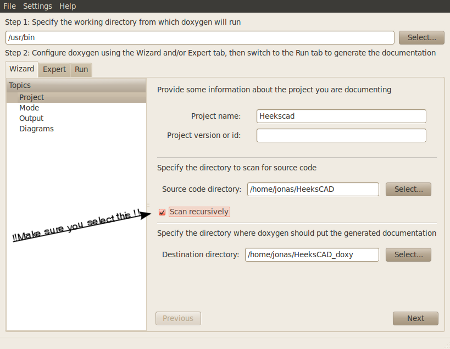
Enter the working directory “/usr/bin” for Doxy “Step 1) Specify the working directory from which doxygen will run”
( Initially I thought I didn’t need to do this (It is missing in some of the following images))
I had issues creating the destination direction from within doxywizard application It seems to work better if the directory already exists.
(But perhaps you’ll have better success)
Also make sure that you click on the scan recursively.

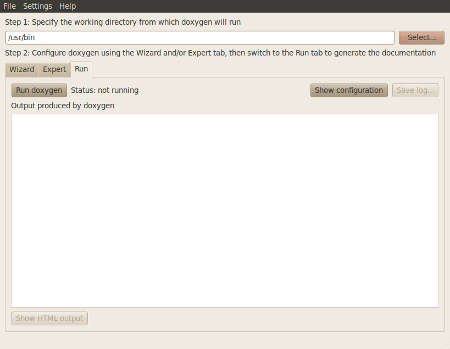
Basically the menu looked like this prior to going clicking on the next button on the bottom right of frame:

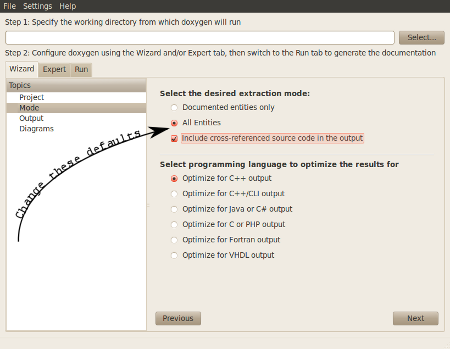
Step 4) Entering parameters into mode.
The only code in heekscad that has been formatted for doxygen is the tinyurl. You’ll need to spread out the net by making the following changes from the default:

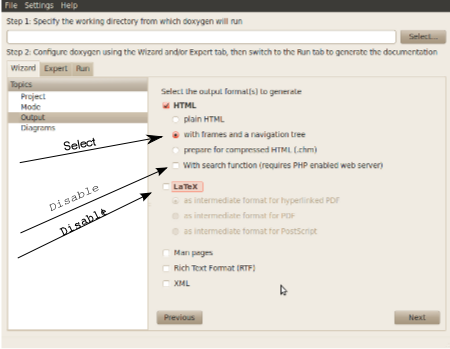
Step 5) Since I’m I was just interested in viewing this locally on my machine I chose the following parameters.

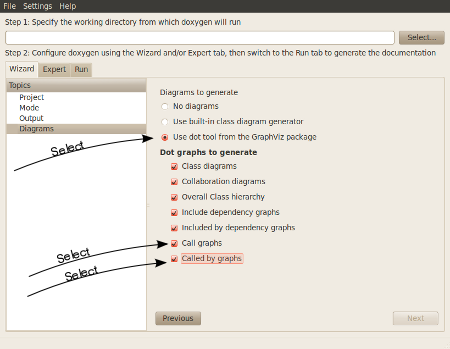
Step 6) Select Diagrams. I liked the results with GraphViz

Step 7) Click on run Doxygen. (If it runs too fast seconds you probably did not click on scan recursivly)

Step 8 ) Click on show HTML output.
Should should see something that looks like this.

Posted in Uncategorized | Leave a comment

Delving into heekscad object->WriteXML(root) hummed to the tune of grandma got run over by a reindeer

This is part of my virtual road trip to write test routine to find constraint bugs, to fix the bugs  that are hosing up my pop-up card project.
I’m working on function to extract constraint information in part  how this data is saved to xml.

I’m trying to write this function as I tear apart the function that saves to xml.  Initially, I thought that all I had to do was to iterate through the m_objects list and everything would spit out.
Well, I was correct insofar as I need to iterate through the list, but that doesn’t represent all the  objects.  It seems to me that what I’m looking at in that saveXML file is the tips of various icebergs represents by sketches.
So…to really see whats going on, I need to get my hammer drill out and part poking around the iceberg around the  WriteXML function.     This function is a virtual function which is declared in the HeekObj.   I pretty much understand how this virtual function stuff works, but I needed at little confirmation that what I thought and what is it are pretty much the same thing.     I found this which to me was conceptually very easy to understand (http://en.wikipedia.org/wiki/Virtual_function

Ok… It seems like I need to understand what’s going on with.
object->WriteXML(root)
So… where does this show up..
Checking my Doxy documentations.

WriteXML() : HeeksObj , Constraint , CoordinateSystem , CEdge , CFace , CGroup , HAngularDimension , HArc , HCircle , HDimension , HEllipse , HILine , HImage , HLine , HPoint , HSpline , HText , HXml , COrientationModifier , CPad , CPocket , CShape , CSketch , CStlSolid

Ok.. So what I think I need for my constraint tester function and what I hope I’m going to run into when I drill down into WriteXML() should hopefully be one in the same.
I’m thinking that I need some type of recursive thing that will iterate from the top of the tree down to the bottom.

Time to generate some more theories to test.
So a HeeksObj base class to me seems to be more of a kid than a parent:
I get this from the HeekObj list pointer called m_owners.

class HeeksObj{
std::list<HeeksObj*> m_owners;
std::list<HeeksObj*>::iterator m_owners_it;
public:
bool m_skip_for_undo;
unsigned int m_id;
unsigned int m_layer;
bool m_visible;
bool m_preserving_id;

HeeksObj(void);
HeeksObj(const HeeksObj& ho);
virtual ~HeeksObj();

I suspected m_owners is a list of the parents that this child belongs to.
Now I think mom and dad are pretty much represented by

class ObjList : public HeeksObj
{
protected:
std::list m_objects;
std::list::iterator LoopIt;
std::list::iterator> LoopItStack;
std::vector m_index_list; // for quick performance of GetAtIndex();
bool m_index_list_valid;

void recalculate_index_list();
void copy_objects(const ObjList& objlist);

public:

Now… I believe the grand matriarch who keeps tabs on the operation is represented HeekCadAPP

class HeeksCADapp : public wxApp, public ObjList
{
private:
std::set observers;
#ifdef USE_UNDO_ENGINE
UndoEngine *history;
#endif
std::map > m_transient_objects;

typedef std::map< int, std::list > IdsToObjects_t;
typedef int GroupId_t;
typedef std::map< GroupId_t, IdsToObjects_t > UsedIds_t;

UsedIds_t used_ids;

// std::map< int, std::map > used_ids; // map of group type ( usually same as object type ) to “map of ID to object”
std::map< int, int > next_id_map;
std::map< std::string, HeeksObj*(*)(TiXmlElement* pElem) > xml_read_fn_map;

void render_screen_text2(const wxChar* str);
void RenderDatumOrCurrentCoordSys(bool select);

Our little matriarch tries to keep a tight reign on things and communication with the outside world I think runs through here via wxApp. Although at the moment, I don’t understand how to frame the relationship with m_transient_objects. Hopefully it’s one of grandma’s family secrets that we don’t need to know.

Now, when you take a look at how constraints are stored in a heekscad xml file that don’t really fall within a traditional family tree. It’s almost as if some parents where being naughty and there where some step-children the by-product. You don’t know where to put them and it’s unclear how to handle them.

One other think, I believe that grandma got around as was married a few times.. The side of the family that I believe her kids that we’re going to be looking at are named “Sketches”

Now this is how I framed this representation in my head, whether it represents reality… I guess we’ll see.

Ok..
back to object->WriteXML(root)
I’m going to create a single line in heekscad and create a breakpoint on WriteXML(root) to see if I can figure out the family dynamic of how grandma talks to here family and deals with here unruly stepchildren (aka constraints).

So.. grandma’s(HeekscadAPP) memory is not too good. She wrote down the address of her kids on a list m_objects ( from her one husband namd the sketches). So if someone asks grandma provide a list of her family (via saveXML) she gets a little red and embarrassed and quietly starts going through her phone book calling her kids(the sketches) via the virtual function WriteXML(root) which appears here:

void CSketch::WriteXML(TiXmlNode *root)
{
if (GetNumChildren() > 0)
{
TiXmlElement * element = new TiXmlElement( “Sketch” );
root->LinkEndChild( element );
element->SetAttribute(“title”, m_title.utf8_str());
WriteBaseXML(element);
}
}

So.. She makes her call to here kids the sketches… Now what’s curious to me is that if the sketch as no kids the phone doesn’t even get picked up (if (GetNumChildren() > 0).
GetNumChildren is a member function of Class Objlist and basically returns the count of the stl list of HeekObj pointers. Essentially Grandma is calling her kids and the first thing the Sketch side of the family tries figure out if they have any kids before they answer. Because WriteXML is a virtual function which is declared in the HeeksObj base class , the answer you get WriteXML may very depending on who inherited from HeekObj. Grandma may have some grandchildren who are maybe a brillliant C++ programmer or a bum…. Because GetNumChildren is not a virtual function, should it get asked within WriteXML, it would get answered the same way.

So… I want to take a look at an XML file of a simple line and compare it to the code above.

<?xml version=”1.0″ encoding=”UTF-8″ ?>
<HeeksCAD_Document>
<Sketch title=“Sketch” id=”1″>
<Line col=”0″ id=”1″>
<Point col=”0″ x=”-18″ y=”3″ z=”0″ id=”1″ />
<Point col=”0″ x=”-2″ y=”14″ z=”0″ id=”2″ />
</Line>
</Sketch>
</HeeksCAD_Document>

I’m making a bunch of assumptions here. I guess I should spet into SetAttribute so we what’s going on with that.
(woe… just a side note. I just stepped throw the constructor of TiXmlElement… I think you could probably spend a week studying that… (At least that’s heavily documented).
Now what gets interesting is when we step into the call:

void ObjList::WriteBaseXML(TiXmlElement *element)
{
std::list<HeeksObj*>::iterator It;
for(It=m_objects.begin(); It!=m_objects.end() ;It++) (*It)->WriteXML(element);
HeeksObj::WriteBaseXML(element);
}

Now it appears that grandma’s kids shares some characterics with grandma’ma in that they have a phone but of their kids and need to make a call to figure out how many children they have, in a similar, but unique way.
Know what’s got me confused is this Objlist::WriteBaseXML and then the HeekSObj::WriteBaseXML(element) later on… I’m not quite sure what’s up with that.
So… I think in this instance WriteXML (with sketch as the parent is going to find one child in here phone book called “Line” (whose going to make the call and find she has two kids named Point))

I see WriteBaseXML being called by all these objects but I get the impression it’s not as polymorphic as WriteXML.  I little trip to my doxy documentation should give me that answer to that.

WriteBaseXML() : HeeksObj , ObjList

Ok.. So two variations to WriteBaseXML.. I get I should list out HeeksOBJ::WriteBaseXML(element) to see if there’s anything that makes sense here.

void HeeksObj::WriteBaseXML(TiXmlElement *element)
{
#ifdef HEEKSCAD
wxGetApp().ObjectWriteBaseXML(this, element);
#else
heeksCAD->ObjectWriteBaseXML(this, element);
#endif
}

I’m not sure I need to deal with the ObjectWriteBaseXML, but I guess we should take a look at it:
Doxy says…
ObjectWriteBaseXML() : CHeeksCADInterface , HeeksCADapp

void HeeksCADapp::ObjectWriteBaseXML(HeeksObj *object, TiXmlElement *element)
{
if(object->UsesID())element->SetAttribute(“id”, object->m_id);
if(!object->m_visible)element->SetAttribute(“vis”, 0);
}

Ohhh… I was wondering where the Id gets set, I guess it’s here.

So the I think the way to think about this now, is that WriteXML is a phone call from the mom to each of here kids to ask them about their kids.
During this call, the Kids go through there phone book, who in turns….. and so and so on.

I suspect that the general recursive pattern is that
WriteXML calls ObjList::WriteBaseXML(TiXmlElement *element) which in recursively calls WriteXML and when its done calls HeeksObj:WriteBaseXML which basically returns the first name (Aka id=) of the object type being called.
I still need to test this out to confirm that I’m looking at this correctly. But it sort of makes sense to me.
Hmm… Out of time and I haven’t drilled down to those naughty stepkids the constraints yet..  Oh well.

I need to do some stuff with the real family…. so later…

Posted in Uncategorized | 2 Comments

Hitting a few little snags on my constraint tester.

I was moving write along..  I got my little test function to fire from the main menu and I tried to get a m_objects as a variable and got myself tripped up a bit because I was attempting to access protected data.

I found some interesting data here.
http://www.parashift.com/c++-faq-lite/basics-of-inheritance.html

Ugg… I thought I was templating from SaveXML but I must be missing something here. So protected data is visible to the object, and objects that inherit that object.

Duh… I think I”m beginning to understand…
I setup my function call like this:

#ifdef CONSTRAINT_TESTER
bool HeeksCADapp::TestForValidConstraints(const std::list<HeeksObj*>& objects)
{
wxMessageBox(_(“Hello World”));
//JT
//The idea to this routine is to search through the object list that savefile uses and see
//is everything makes sense.
//This routine at the moment is only executed manually through the main menu
//The idea is to insert this into various test points to get an idea where constraints are getting screwed up.

}
#endif

I hacked around and was getting errors here:

#ifdef FIRE_CONSTRAINT_TESTER_FROM_MAIN_MENU
static void OnTestConstraint( wxCommandEvent& event )
{

wxGetApp().TestForValidConstraints(m_objects);

}
#endif

Error:

/home/jonas/HeeksCAD/src/HeeksFrame.cpp|1114|error: ‘m_objects’ was not declared in this scope|

I was wondering earlier why they had this inline function defined:

void SaveXMLFile(const wxChar *filepath){SaveXMLFile(m_objects, filepath);}

It makes sense now my TestForValidConstraints is outside any object therefore is m_objects is protected it is not visible.
So from the context of mimicking a file save I need to do something similar here and get rid of the m_objects in my call and all should be well.

Eehh… this is embarrassingly obvious.
This is what I needed:

//JT
#ifdef CONSTRAINT_TESTER
bool TestForValidConstraints(){return TestForValidConstraints(m_objects);};//m_objects is protected and visible to class or sub_class
bool TestForValidConstraints(const std::list<HeeksObj*>& objects);

#endif

(Running into a small issue.. When I compile because I’m working in a baseclass it seems that everything recompiles and takes a lot or time. (I wonder if there is away around that or that’s just need to grin and bear it (Santa if your out that a nice quad-core would be appreciated under the tree 😉 )
Hmmm.. I saw there was an option to compile the current file in code::blocks I need to try that next. That might be the ticket.

Ok. Everything seems to be working the way I want.
Now.. To start getting a little into the bloody details.
I probably should get an understanding of how m_objects gets populated, but for the moment, I’m just going to accept that it exists.
When I start pulling up constraint errors I guess I’ll need to figure it out.

Here is the section of code that I needs to be dissected:

void HeeksCADapp::SaveXMLFile(const std::list& objects, const wxChar *filepath, bool for_clipboard)
{
// write an xml file
TiXmlDocument doc;
const char *l_pszVersion = “1.0”;
const char *l_pszEncoding = “UTF-8”;
const char *l_pszStandalone = “”;

TiXmlDeclaration* decl = new TiXmlDeclaration( l_pszVersion, l_pszEncoding, l_pszStandalone);
doc.LinkEndChild( decl );

TiXmlNode* root = &doc;
if(!for_clipboard)
{
root = new TiXmlElement( “HeeksCAD_Document” );
doc.LinkEndChild( root );
}

// loop through all the objects writing them
CShape::m_solids_found = false;
Constraint::BeginSave();
for(std::list::const_iterator It = objects.begin(); It != objects.end(); It++)
{
HeeksObj* object = *It;
object->WriteXML(root);
}

// write the constraints to the root-if check box is selected
if (m_save_constraints){
Constraint::EndSave(root);

}

I have poked around a little in this code already so I sort of know whats going on here, but I still fuzzy one a bunch of stuff.
I know constraints don’t lend themselves to parent child xml type data which is why they saved as a root.  Looking at the code it seems to me that m_objects contains parent objects which WriteXML drills down further.  I’m not sure that’s correct but I suppose that’s easy enough to test by drawing a single line in heeksCAD and single stepping in debug to see what happens.

void CSketch::WriteXML(TiXmlNode *root)
{
if (GetNumChildren() > 0)
{
TiXmlElement * element = new TiXmlElement( “Sketch” );
root->LinkEndChild( element );
element->SetAttribute(“title”, m_title.utf8_str());
WriteBaseXML(element);
}
}

Wonder what happens with GetNumChildren()

int ObjList::GetNumChildren()
{
return m_objects.size();
}

I suppose we go one deeper…
Oh… Too deep duh… the steps me into stl_list.h I think the m_objects where looking at here is not m_objects that’s inside the object (I think line) not the m_objects within HeeksCADapp (time to step out..)

The next thing that interests me is the WriteBaseXML

void ObjList::WriteBaseXML(TiXmlElement *element)
{
std::list::iterator It;
for(It=m_objects.begin(); It!=m_objects.end() ;It++) (*It)->WriteXML(element);
HeeksObj::WriteBaseXML(element);

Time to peek into WriteBaseXML:

void HeeksObj::WriteBaseXML(TiXmlElement *element)
{
#ifdef HEEKSCAD
wxGetApp().ObjectWriteBaseXML(this, element);
#else
heeksCAD->ObjectWriteBaseXML(this, element);
#endif

So this is where the ID gets written out.

void HeeksCADapp::ObjectWriteBaseXML(HeeksObj *object, TiXmlElement *element)
{
if(object->UsesID())element->SetAttribute(“id”, object->m_id);
if(!object->m_visible)element->SetAttribute(“vis”, 0);
}

Alright/… so the file I just created just looks like this:

<?xml version=”1.0″ encoding=”UTF-8″ ?>
<HeeksCAD_Document>
<Sketch title=”Sketch” id=”1″>
<Line col=”0″ id=”1″>
<Point col=”0″ x=”-21″ y=”6″ z=”0″ id=”1″ />
<Point col=”0″ x=”-2″ y=”12″ z=”0″ id=”2″ />
</Line>
</Sketch>
</HeeksCAD_Document>

So I believe that I have 3 heeksobj’s here,  I line and two children points..
Double checking here.
Yep…. Just one pass….
So… I think if I draw 2 lines connected by a coincident point constraint it should be 3 passes… I’m talking about this section of code which is in:
void HeeksCADapp::SaveXMLFile(const std::list& objects, const wxChar *filepath, bool for_clipboard)

…..
for(std::list::const_iterator It = objects.begin(); It != objects.end(); It++)
{
HeeksObj* object = *It;
object->WriteXML(root);
}
…..

Heh??? Only one pass… Darn… that would have been too easy..
I wonder if m_objects at HeeksCADapp is referring to sketches.. I suppose that’s easy enough to check out.
Create two sketches and see if we just get 2 passes: Yep that works…. but has made life much more complicated…

Ok… I need to create two sketches consisting of two lines each connected with a coincident point constraint and see how the data looks like.

<?xml version=”1.0″ encoding=”UTF-8″ ?>
<HeeksCAD_Document>
<Sketch title=”Sketch” id=”1″>
<Line col=”0″ id=”1″>
<Point col=”0″ x=”-24″ y=”12″ z=”0″ id=”1″ />
<Point col=”0″ x=”-13″ y=”21″ z=”0″ id=”2″ />
</Line>
<Line col=”0″ id=”2″>
<Point col=”0″ x=”-13″ y=”21″ z=”0″ id=”5″ />
<Point col=”0″ x=”4″ y=”16″ z=”0″ id=”6″ />
</Line>
</Sketch>
<Sketch title=”Sketch” id=”2″>
<Line col=”0″ id=”3″>
<Point col=”0″ x=”-24″ y=”-13″ z=”0″ id=”21″ />
<Point col=”0″ x=”-14″ y=”-3″ z=”0″ id=”22″ />
</Line>
<Line col=”0″ id=”4″>
<Point col=”0″ x=”-14″ y=”-3″ z=”0″ id=”25″ />
<Point col=”0″ x=”-5″ y=”-13″ z=”0″ id=”26″ />
</Line>
</Sketch>
<Constraint type=”CoincidantPointConstraint” angle=”AbsoluteAngleHorizontal” length=”0″ obj1_id=”2″ obj1_type=”2″ obj2_id=”5″ obj2_type=”2″ id=”1″ />
<Constraint type=”CoincidantPointConstraint” angle=”AbsoluteAngleHorizontal” length=”0″ obj1_id=”22″ obj1_type=”2″ obj2_id=”25″ obj2_type=”2″ id=”2″ />
</HeeksCAD_Document>

Ugg…
Getting back to:

Constraint::BeginSave(); // This clears out obj_to_save and obj_to_save_find
// This constraint list appears to be declared globally not within any object in
// src/Constraint.cpp
//static std::list obj_to_save;
//static std::set obj_to_save_find;
for(std::list::const_iterator It = objects.begin(); It != objects.end(); It++) // SaveXML when called from savefile object is passing a m_objects list
// Declared in HeeksCADapp
// m_objects apparently is a list of sketch objects
{
HeeksObj* object = *It;
object->WriteXML(root); //so here were drilling down from the sketch object
//somewhere in this process when we run across a constraint object, a pointer to it gets send to obj_to_save
//great 🙁
}

// write the constraints to the root-if check box is selected
if (m_save_constraints){
Constraint::EndSave(root);
}

Well… So much for the easy routine… I guess what I need to do is to drill down into WriteXML(root) to really understand what’s going on there.
But I think I’m going just push my little function just a bit further.

I just loaded my two sketch to line sample and fired it up this routine and got two messages to fire…
//asdf
#ifdef CONSTRAINT_TESTER
bool HeeksCADapp::TestForValidConstraints(const std::list& objects)
{

//JT
//The idea to this routine is to search through the object list that savefile uses and see
//is everything makes sense.
//This routine at the moment is only executed manually through the main menu
//The idea is to insert this into various test points to get an idea where constraints are getting screwed up.
for(std::list::const_iterator It = objects.begin(); It != objects.end(); It++)
{
HeeksObj* object = *It;
wxMessageBox(_(“Hello World from inside TestforValidConstraints”));
//object need to do something more here.
}
}
#endif

That’s enough of this for a while..
Next step is to dive into writeXML(root)..

Posted in Uncategorized | Leave a comment

Menu Launch for the heekscad constraint validator

I think I have it in my minds eye how I want to build this heekscad constraint tester.
Ultimately, I want to move this thing in the code like a probe on a mutlimeter to figure out where things are going are going south.  To start out  I want to create something on the menu bar. I think I’m going to call it   “Constraint Tester” as I think Alt-C is available

So I think if I search for “Set Origin” I should be able to find what I need to plug into.

Ok… Just need to keep track of a few things here.
src/stdafx.h

…….

// Window Menu
m_menuWindow = new wxMenu;
AddMenuItem(m_menuWindow, _(“Objects”), wxBitmap(), OnViewObjects, OnUpdateViewObjects, NULL, true);
AddMenuItem(m_menuWindow, _(“Log”), wxBitmap(), OnLog);
AddMenuItem(m_menuWindow, _(“Options”), wxBitmap(), OnViewOptions, OnUpdateViewOptions, NULL, true);
AddMenuItem(m_menuWindow, _(“Input”), wxBitmap(), OnViewInput, OnUpdateViewInput, NULL, true);
AddMenuItem(m_menuWindow, _(“Properties”), wxBitmap(), OnViewProperties, OnUpdateViewProperties, NULL, true);
AddMenuItem(m_menuWindow, _(“Tool Bar”), wxBitmap(), OnViewToolBar, OnUpdateViewToolBar, NULL, true);
AddMenuItem(m_menuWindow, _(“Solids Tool Bar”), wxBitmap(), OnViewSolidBar, OnUpdateViewSolidBar, NULL, true);
AddMenuItem(m_menuWindow, _(“Geometry Tool Bar”), wxBitmap(), OnViewGeometryBar, OnUpdateViewGeometryBar, NULL, true);
AddMenuItem(m_menuWindow, _(“Viewing Tool Bar”), wxBitmap(), OnViewViewingBar, OnUpdateViewViewingBar, NULL, true);
AddMenuItem(m_menuWindow, _(“Status Bar”), wxBitmap(), OnViewStatusBar, OnUpdateViewStatusBar, NULL, true);

//JT
#ifdef FIRE_CONSTRAINT_TESTER_FROM_MAIN_MENU
wxMenu * m_menuConstraintTester = new wxMenu;
AddMenuItem(m_menuConstraintTester, _(“Validate Constraints”), wxBitmap(), OnTestConstraint);

#endif

……….
// Add them to the main menu
m_menuBar = new wxMenuBar;
m_menuBar->Append( file_menu, _( “&File” ) );
m_menuBar->Append( edit_menu, _( “&Edit” ) );
m_menuBar->Append( view_menu, _( “&View” ) );
m_menuBar->Append( geometry_menu, _( “&Geometry” ) );
m_menuBar->Append( solids_menu, _( “&Solid” ) );
m_menuBar->Append( coordinate_menu, _( “&Set Origin” ) );
m_menuBar->Append( transform_menu, _( “&Transform” ) );
m_menuBar->Append( m_menuWindow, _( “&Window” ) );

//JT
#ifdef FIRE_CONSTRAINT_TESTER_FROM_MAIN_MENU

m_menuBar->Append( m_menuConstraintTester, _( “&Constraint Tester” ) );
#endif

src/HeeksFrame.h
I thought I was going to need something here but turns out I didn’t
src/HeeksCAD.h

//JT
#ifdef CONSTRAINT_TESTER
bool TestForValidConstraints();
#endif

src/HeeksCAD.cpp

void HeeksCADapp::RegisterOnBuildTexture(void(*callbackfunc)())
{
m_on_build_texture_callbacks.push_back(callbackfunc);
}

#ifdef CONSTRAINT_TESTER
bool HeeksCADapp::TestForValidConstraints();
{
wxMessageBox(_(“Hello World”));
}
#endif

src/HeeksFrame.cpp

static void OnMoveScaleButton( wxCommandEvent& event )
{
TransformTools::Scale(false);
}

//JT
#ifdef FIRE_CONSTRAINT_TESTER_FROM_MAIN_MENU
static void OnTestConstraint( wxCommandEvent& event )
{
wxGetApp().TestForValidConstraints();
}
#endif

http://docs.wxwidgets.org/2.6/wx_appinifunctions.html#wxgetapp

Nothing worthy of committed yet. But I think I have a place to write some code.

I think my next step is to research HeeksCADapp::SaveFile a bit. I’m tired… Sorry world about the typo’s

Posted in Uncategorized | Leave a comment

Looking a bit more at the constraint validator