
I haven’t explored this site in detail. But I like what I saw on the page I hit.
I was trying to dust off my memory on how to format money in using a terminal prompt.
I haven’t explored this site in detail. But I like what I saw on the page I hit.
I was trying to dust off my memory on how to format money in using a terminal prompt.
These are just some quick place holder notes for myself. If you read this and find useful all the better.
Anyway…
Getting code::blocks to redirect input from the console to a file is pretty easy.
Here’s the reference link: http://forums.codeblocks.org/index.php/topic,13887.0.html
Now..
I did some quick going for io redirection and found this interesting link..
http://linuxhelp.blogspot.com/2006/01/inputoutput-redirection-made-simple-in.html
Hmm… redirecting a mouse output to a screen.. Coolll… just not right now. Need to get back to the homework project.
Ok… this one is looking interesting to me also.
http://linux.byexamples.com/archives/349/how-to-redirect-output-to-a-file-as-well-as-display-it-out/
[edit… Sorry about the roughness of this page. I like to keep notes of when I do something so if I wind up screwing something up, I can figure out what happened. I managed to accomplish my goal but really have the time to make this look all pretty and professional.. If you can’t decipher my notes, I left links on where I got my info from]
Ok.. So I’ve been using VS10 at work and if I want to look at a source and header file at the same time, I can just drag the file off the tab and it shows up as a individual window. Sweet. I’m working on my project for my c++ class and I want to do the same thing on code::blocks on my linux machine. Hmm…
So far I’ve been able to tab on the same.
Looking through the code::blocks IDE it’s not obvious(too me at least on how to do that).
Ok a little googling here and we come up with this post:
http://forums.codeblocks.org/index.php?topic=9255.0
Sooo.. Nov 2008 code::blocks folks were testing a patch which enables that feature… if you would have searched the forum you would have seen that blah blah blah.. Ok… (would have been nice if the moderator would have provided a link to that discussion..) This looks like it can be done. So… But how..
Ok… I think I found it:
http://forums.codeblocks.org/index.php/topic,12885.0.html
The magic search term seems to be split view. Oh..
“It’s a feature we have added between 8.02 and 10.05,”
Ah heck.. Nothing is ever easy. Ok… Just look at synaptic it looks like 8.02 is in the repository.
So… found instructions sort of for 64 bit (I’m running 32 bit) here:
http://forums.codeblocks.org/index.php/topic,12662.0.html
I’m not sure this is a clean set of instructions though..
Ok… So I found this:
http://wiki.codeblocks.org/index.php?title=Installing_Code::Blocks_nightly_build_on_Ubuntu
I think I found “the spot”
http://apt.jenslody.de/
Ok.. Lets see. Instructions don’t say to do this but I guess I should uninstall my current version of code::blocks
Since I have synaptic up already, I’ll just use the gui. I basically had codeblocks libcodeblocks0 in the synaptic repository. Ok… Need to get out of that so, I can use sudo apt-get from terminal later..
Ok… Find the code:: http://www.codeblocks.org/downloads
Now… I’m find a deadline here… If I would have a bit more time I would download the source but I have a bit of a deadline here so, I’m going to opt for the binary.
[edit: in hindsite wrong path]
I believe for my situation this is what I need.

codeblocks-10.05-1-debian-i386.tar.bz2
codeblocks-10.05-1-debian-dbg-i386.tar.bz2
So…. Big file it’s going to take a few minutes on my slow connection.
So… I see some stuff on getting the latest and greatest (ahead of synaptic) for ubuntu on jen’s page.
http://wiki.wxpython.org/InstallingOnUbuntuOrDebian
Seems like a good idea.
step 1)
curl http://apt.wxwidgets.org/key.asc | sudo apt-key add –
I didn’t have curl so I need to add that.
DESCRIPTION
curl is a tool to transfer data from or to a server, using one of the supported protocols (HTTP, HTTPS, FTP, FTPS, SCP, SFTP,
TFTP, DICT, TELNET, LDAP or FILE). The command is designed to work without user interaction.curl offers a busload of useful tricks like proxy support, user authentication, FTP upload, HTTP post, SSL connections, cookies,
file transfer resume and more. As you will see below, the number of features will make your head spin!curl is powered by libcurl for all transfer-related features. See libcurl(3) for details
Lets try step 1. Again.. Success..
Step 2.)
sudo gedit /etc/apt/sources.list
so… I need to fix this string up:
# wxWidgets/wxPython repository at apt.wxwidgets.org
deb http://apt.wxwidgets.org/ DIST-wx main
deb-src http://apt.wxwidgets.org/ DIST-wx main
Oh.. this is sort of cool:
jonas@jonas5:~$ lsb_release -a
No LSB modules are available.
Distributor ID: Ubuntu
Description: Ubuntu 10.04.2 LTS
Release: 10.04
Codename: lucid
jonas@jonas5:~$
since I have 10.04 I need to make this look like this.
# wxWidgets/wxPython repository at apt.wxwidgets.org
deb http://apt.wxwidgets.org/ lucid-wx main
deb-src http://apt.wxwidgets.org/ lucid-wx main
done… save and edit.
step 4.)
sudo apt-get update
no biggy..
Step 5.)
sudo apt-get install python-wxgtk2.8 python-wxtools wx2.8-i18n
I do a fair amount of building from source… so we’ll go this one also.
sudo apt-get install python-wxgtk2.8 python-wxtools wx2.8-i18n libwxgtk2.8-dev libgtk2.0-dev
Ok… Now back to code::blocks
For now… I’m just going to stop here and just install the tar’s I just down loaded…
Opening the download folder..Ah heck.. things just got a bit confusing.
Ok.. NOTE: The Debian packages above are compressed archives (tar.bz2). When you decompress the package you downloaded on your system, you will find all the .deb packages required to install Code::Blocks. The packages named *-dbg-* contain the files needed to debug Code::Blocks itself, not needed for the most users.
Oh… when I tried installing to individually install the deb’s I got all these dependancy issues.
Ok.. I’m trying this route in adding this to my sources list.
deb http://apt.jenslody.de/ any maindeb-src http://apt.jenslody.de/ any main
and then this from the terminal
sudo apt-get update
sudo apt-get install jens-lody-debian-keyring
sudo apt-get update
ugg.. I tried to click on my code blocks icon left over from my 8.02 and nothing happens.
Ok.. Do I need to do a sudo apt-get install codeblocks?? Well I guess I'll see what happens.
Hot darn it seems to be working.
So... I'm able to view to files simultaneously the only downside is so far I can only do it horizontally, my preference would be to do it side by side vertically. Oh well... better than what I had before... Like I said fighting a deadline and my daughter just came in my office wanting to play our saturday morning games..
[Edit Splitting vertically can be done. http://forums.codeblocks.org/index.php?topic=10897.0 Not sure how I did it... I dragged it around till it worked..
Ok.. I haven’t had what I would call my most productive weekend.
My daughter happened to remind me about the computer game I said I’d write for her.
Well, since I’m taking a class in C++ I thought what the hey. I need the coding practise, so I thought this would be a good exercise. The game tutorial series that I’d been looking at here to template off of uses a md2 file for its action models.
Ah…I think this is where I got stuck the last time, I went down this path. In order to produce this model, I needed to use Blender. Blender 2.4x while exceedingly powerful was not vary intuitive to use. There was talk at the time about the 2.5x alpha versions of Blender that a totally reworked easy to use front end. I decided to put this project aside for a while and wait for the next version.
Doing a little research, it seemed like Blender 2.54a beta has been getting some pretty good buzz on the net. Perhaps not quite a “release” but darn close. The only negative is that it can’t export a md2 directly at the moment. I saw some talk about using 2.54 and then downgrading to a lower version for the export. Uggg….
So… Complicating matters even further I watched a youtube Super3boy:Super3boy’s Blender Tutorials – RPG Series #1 (Intro to Logic Bricks)
that frankly really impressed me as how far Blender has come.
So.. I think this might be a path worth pursuing. My child really enjoys art and it would be fun to have here create something that could be inserted into a game. I’m hoping that I can use C++ to sharpen my skills, but if that looks impractical another approach vector would be to use the Blender game engine.
I like super3boys video’s so I think my next step is to work through them and go from there.
My 8 year old has been wanting me to write a computer game for here for some time.
I’m currently taking a second course in c++ and I do need the practice so what the heck.
I found this most excellent guide at: http://www.videotutorialsrock.com/opengl_tutorial/crab_pong/home.php
I thought perhaps I could hack up the code and getting it running in Ubuntu
So… I downloaded the source and created a code::blocks project and the first message error I get is this:
||=== crab_game, Debug ===|
/home/jonas/crab_game/crab_game/gamedrawer.cpp|33|error: GL/glut.h: No such file or directory|
/home/jonas/crab_game/crab_game/gamedrawer.h|50|error: ‘GLuint’ does not name a type|
/home/jonas/crab_game/crab_game/gamedrawer.h|54|error: ‘GLuint’ does not name a type|
/home/jonas/crab_game/crab_game/gamedrawer.h|56|error: ‘GLuint’ does not name a type|
/home/jonas/crab_game/crab_game/gamedrawer.h|58|error: ‘GLuint’ does not name a type|
/home/jonas/crab_game/crab_game/md2model.h|66|error: ‘GLuint’ was not declared in this scope|
/home/jonas/crab_game/crab_game/md2model.h|66|error: template argument 1 is invalid|
/home/jonas/crab_game/crab_game/md2model.h|66|error: template argument 2 is invalid|
/home/jonas/crab_game/crab_game/gamedrawer.cpp|78|error: ‘GLuint’ does not name a type|
/home/jonas/crab_game/crab_game/gamedrawer.cpp||In constructor ‘GameDrawer::GameDrawer()’:|
/home/jonas/crab_game/crab_game/gamedrawer.cpp|114|error: ‘sandTextureId’ was not declared in this scope|
/home/jonas/crab_game/crab_game/gamedrawer.cpp|114|error: ‘loadTexture’ was not declared in this scope|
/home/jonas/crab_game/crab_game/gamedrawer.cpp|118|error: ‘waterTextureId’ was not declared in this scope|
/home/jonas/crab_game/crab_game/gamedrawer.cpp||In member function ‘void GameDrawer::setupBarriers()’:|
/home/jonas/crab_game/crab_game/gamedrawer.cpp|160|error: ‘GLuint’ was not declared in this scope|
/home/jonas/crab_game/crab_game/gamedrawer.cpp|160|error: expected ‘;’ before ‘textureId’|
/home/jonas/crab_game/crab_game/gamedrawer.cpp|163|error: expected ‘;’ before ‘barrierDisplayListId’|
/home/jonas/crab_game/crab_game/gamedrawer.cpp|164|error: ‘barrierDisplayListId’ was not declared in this scope|
/home/jonas/crab_game/crab_game/gamedrawer.cpp|164|error: ‘GL_COMPILE’ was not declared in this scope|
/home/jonas/crab_game/crab_game/gamedrawer.cpp|164|error: ‘glNewList’ was not declared in this scope|
/home/jonas/crab_game/crab_game/gamedrawer.cpp|167|error: ‘GL_TEXTURE_2D’ was not declared in this scope|
/home/jonas/crab_game/crab_game/gamedrawer.cpp|167|error: ‘glEnable’ was not declared in this scope|
/home/jonas/crab_game/crab_game/gamedrawer.cpp|168|error: ‘textureId’ was not declared in this scope|
/home/jonas/crab_game/crab_game/gamedrawer.cpp|168|error: ‘glBindTexture’ was not declared in this scope|
/home/jonas/crab_game/crab_game/gamedrawer.cpp|169|error: ‘GL_TEXTURE_MIN_FILTER’ was not declared in this scope|
/home/jonas/crab_game/crab_game/gamedrawer.cpp|169|error: ‘GL_LINEAR’ was not declared in this scope|
/home/jonas/crab_game/crab_game/gamedrawer.cpp|169|error: ‘glTexParameteri’ was not declared in this scope|
/home/jonas/crab_game/crab_game/gamedrawer.cpp|170|error: ‘GL_TEXTURE_MAG_FILTER’ was not declared in this scope|
/home/jonas/crab_game/crab_game/gamedrawer.cpp|172|error: ‘GLfloat’ was not declared in this scope|
/home/jonas/crab_game/crab_game/gamedrawer.cpp|172|error: expected ‘;’ before ‘materialColor’|
/home/jonas/crab_game/crab_game/gamedrawer.cpp|173|error: ‘GL_FRONT’ was not declared in this scope|
/home/jonas/crab_game/crab_game/gamedrawer.cpp|173|error: ‘GL_AMBIENT_AND_DIFFUSE’ was not declared in this scope|
/home/jonas/crab_game/crab_game/gamedrawer.cpp|173|error: ‘materialColor’ was not declared in this scope|
/home/jonas/crab_game/crab_game/gamedrawer.cpp|173|error: ‘glMaterialfv’ was not declared in this scope|
/home/jonas/crab_game/crab_game/gamedrawer.cpp|175|error: ‘glNormal3f’ was not declared in this scope|
/home/jonas/crab_game/crab_game/gamedrawer.cpp|176|error: ‘GL_TRIANGLE_FAN’ was not declared in this scope|
/home/jonas/crab_game/crab_game/gamedrawer.cpp|176|error: ‘glBegin’ was not declared in this scope|
/home/jonas/crab_game/crab_game/gamedrawer.cpp|177|error: ‘glTexCoord2f’ was not declared in this scope|
/home/jonas/crab_game/crab_game/gamedrawer.cpp|178|error: ‘glVertex3f’ was not declared in this scope|
/home/jonas/crab_game/crab_game/gamedrawer.cpp|186|error: ‘glEnd’ was not declared in this scope|
/home/jonas/crab_game/crab_game/gamedrawer.cpp|189|error: expected ‘;’ before ‘materialColor2’|
/home/jonas/crab_game/crab_game/gamedrawer.cpp|190|error: ‘materialColor2’ was not declared in this scope|
/home/jonas/crab_game/crab_game/gamedrawer.cpp|192|error: ‘glDisable’ was not declared in this scope|
/home/jonas/crab_game/crab_game/gamedrawer.cpp|193|error: ‘glColor3f’ was not declared in this scope|
/home/jonas/crab_game/crab_game/gamedrawer.cpp|204|error: ‘GL_QUAD_STRIP’ was not declared in this scope|
/home/jonas/crab_game/crab_game/gamedrawer.cpp|215|error: ‘glEndList’ was not declared in this scope|
/home/jonas/crab_game/crab_game/gamedrawer.cpp|220|error: ‘barriersDisplayListId’ was not declared in this scope|
/home/jonas/crab_game/crab_game/gamedrawer.cpp|220|error: ‘glGenLists’ was not declared in this scope|
/home/jonas/crab_game/crab_game/gamedrawer.cpp|222|error: ‘GL_COLOR_MATERIAL’ was not declared in this scope|
/home/jonas/crab_game/crab_game/gamedrawer.cpp|225|error: expected ‘;’ before ‘materialSpecular’|
/home/jonas/crab_game/crab_game/gamedrawer.cpp|226|error: ‘GL_SPECULAR’ was not declared in this scope|
/home/jonas/crab_game/crab_game/gamedrawer.cpp|226|error: ‘materialSpecular’ was not declared in this scope|
||More errors follow but not being shown.|
||Edit the max errors limit in compiler options…|
||=== Build finished: 50 errors, 0 warnings ===|
Hm… Soo lets hack away at the errors:
I did a quick search and found this info: http://ubuntuforums.org/showthread.php?t=1108737
Ok..
I’m pretty sure I have the required libraries but I think I’ll try this
jonas@jonas5:~$ sudo apt-get install freeglut3 freeglut3-dev
Reading package lists… Done
Building dependency tree
Reading state information… Done
freeglut3 is already the newest version.
freeglut3 set to manually installed.
The following extra packages will be installed:
libice-dev libsm-dev libxext-dev libxt-dev x11proto-xext-dev
The following NEW packages will be installed:
freeglut3-dev libice-dev libsm-dev libxext-dev libxt-dev x11proto-xext-dev
0 upgraded, 6 newly installed, 0 to remove and 0 not upgraded.
Need to get 904kB of archives.
After this operation, 3,002kB of additional disk space will be used.
Do you want to continue [Y/n]? Y
Get:1 http://us.archive.ubuntu.com/ubuntu/ lucid/main libice-dev 2:1.0.6-1 [60.0kB]
Get:2 http://us.archive.ubuntu.com/ubuntu/ lucid/main libsm-dev 2:1.1.1-1 [26.6kB]
Get:3 http://us.archive.ubuntu.com/ubuntu/ lucid/main libxt-dev 1:1.0.7-1 [491kB]
Get:4 http://us.archive.ubuntu.com/ubuntu/ lucid/main x11proto-xext-dev 7.1.1-2 [27.2kB]
Get:5 http://us.archive.ubuntu.com/ubuntu/ lucid/main libxext-dev 2:1.1.1-2 [102kB]
Get:6 http://us.archive.ubuntu.com/ubuntu/ lucid/main freeglut3-dev 2.6.0-0ubuntu2 [197kB]
Fetched 904kB in 8s (107kB/s)
Selecting previously deselected package libice-dev.
(Reading database … 382664 files and directories currently installed.)
Unpacking libice-dev (from …/libice-dev_2%3a1.0.6-1_i386.deb) …
Selecting previously deselected package libsm-dev.
Unpacking libsm-dev (from …/libsm-dev_2%3a1.1.1-1_i386.deb) …
Selecting previously deselected package libxt-dev.
Unpacking libxt-dev (from …/libxt-dev_1%3a1.0.7-1_i386.deb) …
Selecting previously deselected package x11proto-xext-dev.
Unpacking x11proto-xext-dev (from …/x11proto-xext-dev_7.1.1-2_all.deb) …
Selecting previously deselected package libxext-dev.
Unpacking libxext-dev (from …/libxext-dev_2%3a1.1.1-2_i386.deb) …
Selecting previously deselected package freeglut3-dev.
Unpacking freeglut3-dev (from …/freeglut3-dev_2.6.0-0ubuntu2_i386.deb) …
Processing triggers for man-db …
Setting up libice-dev (2:1.0.6-1) …
Setting up libsm-dev (2:1.1.1-1) …
Setting up libxt-dev (1:1.0.7-1) …
Setting up x11proto-xext-dev (7.1.1-2) …
Setting up libxext-dev (2:1.1.1-2) …
Setting up freeglut3-dev (2.6.0-0ubuntu2) …
jonas@jonas5:~$
Ok… So I’m missing something the dev
Soo… Now I left with these error.
/home/jonas/crab_game/crab_game/imageloader.cpp||In function ‘Image* loadBMP(const char*)’:|
/home/jonas/crab_game/crab_game/imageloader.cpp|141|warning: suggest parentheses around ‘&&’ within ‘||’|
/home/jonas/crab_game/crab_game/md2model.cpp|363|error: ‘strlen’ was not declared in this scope|
/home/jonas/crab_game/crab_game/md2model.cpp|364|error: ‘strcmp’ was not declared in this scope|
/home/jonas/crab_game/crab_game/md2model.cpp||In member function ‘void MD2Model::setAnimation(const char*)’:|
/home/jonas/crab_game/crab_game/md2model.cpp|439|error: ‘strlen’ was not declared in this scope|
/home/jonas/crab_game/crab_game/md2model.cpp|440|error: ‘strncmp’ was not declared in this scope|
||=== Build finished: 4 errors, 1 warnings ===|
Hmm.
According to http://www.cplusplus.com/reference/clibrary/cstring/strlen/
I need to #include <string.h> so I added that to the top of md2model.cpp. (Not sure if thats the best spot but lets see what happens.)
Uggg… We’re not there yet… Now I get this.
obj/Debug/gamedrawer.o||In function
(anonymous namespace)::loadTexture(Image*)':|glGenTextures’|
/home/jonas/crab_game/crab_game/gamedrawer.cpp|80|undefined reference to
/home/jonas/crab_game/crab_game/gamedrawer.cpp|81|undefined reference toglBindTexture'|glTexImage2D’|
/home/jonas/crab_game/crab_game/gamedrawer.cpp|89|undefined reference to
obj/Debug/gamedrawer.o||In functionGameDrawer::setupBarriers()':|glGenLists’|
/home/jonas/crab_game/crab_game/gamedrawer.cpp|163|undefined reference to
/home/jonas/crab_game/crab_game/gamedrawer.cpp|164|undefined reference toglNewList'|glEnable’|
/home/jonas/crab_game/crab_game/gamedrawer.cpp|167|undefined reference to
/home/jonas/crab_game/crab_game/gamedrawer.cpp|168|undefined reference toglBindTexture'|glTexParameteri’|
/home/jonas/crab_game/crab_game/gamedrawer.cpp|169|undefined reference to
/home/jonas/crab_game/crab_game/gamedrawer.cpp|170|undefined reference toglTexParameteri'|glMaterialfv’|
/home/jonas/crab_game/crab_game/gamedrawer.cpp|173|undefined reference to
/home/jonas/crab_game/crab_game/gamedrawer.cpp|175|undefined reference toglNormal3f'|glBegin’|
/home/jonas/crab_game/crab_game/gamedrawer.cpp|176|undefined reference to
/home/jonas/crab_game/crab_game/gamedrawer.cpp|177|undefined reference toglTexCoord2f'|glVertex3f’|
/home/jonas/crab_game/crab_game/gamedrawer.cpp|178|undefined reference to
/home/jonas/crab_game/crab_game/gamedrawer.cpp|181|undefined reference toglTexCoord2f'|glVertex3f’|
/home/jonas/crab_game/crab_game/gamedrawer.cpp|184|undefined reference to
/home/jonas/crab_game/crab_game/gamedrawer.cpp|186|undefined reference toglEnd'|glMaterialfv’|
/home/jonas/crab_game/crab_game/gamedrawer.cpp|190|undefined reference to
/home/jonas/crab_game/crab_game/gamedrawer.cpp|192|undefined reference toglDisable'|glColor3f’|
/home/jonas/crab_game/crab_game/gamedrawer.cpp|193|undefined reference to
/home/jonas/crab_game/crab_game/gamedrawer.cpp|194|undefined reference toglNormal3f'|glBegin’|
/home/jonas/crab_game/crab_game/gamedrawer.cpp|195|undefined reference to
/home/jonas/crab_game/crab_game/gamedrawer.cpp|196|undefined reference toglVertex3f'|glVertex3f’|
/home/jonas/crab_game/crab_game/gamedrawer.cpp|199|undefined reference to
/home/jonas/crab_game/crab_game/gamedrawer.cpp|201|undefined reference toglEnd'|glBegin’|
/home/jonas/crab_game/crab_game/gamedrawer.cpp|204|undefined reference to
/home/jonas/crab_game/crab_game/gamedrawer.cpp|207|undefined reference toglNormal3f'|glVertex3f’|
/home/jonas/crab_game/crab_game/gamedrawer.cpp|209|undefined reference to
/home/jonas/crab_game/crab_game/gamedrawer.cpp|212|undefined reference toglVertex3f'|glEnd’|
/home/jonas/crab_game/crab_game/gamedrawer.cpp|214|undefined reference to
/home/jonas/crab_game/crab_game/gamedrawer.cpp|215|undefined reference toglEndList'|glGenLists’|
/home/jonas/crab_game/crab_game/gamedrawer.cpp|220|undefined reference to
/home/jonas/crab_game/crab_game/gamedrawer.cpp|221|undefined reference toglNewList'|glDisable’|
/home/jonas/crab_game/crab_game/gamedrawer.cpp|222|undefined reference to
/home/jonas/crab_game/crab_game/gamedrawer.cpp|226|undefined reference toglMaterialfv'|glMaterialf’|
/home/jonas/crab_game/crab_game/gamedrawer.cpp|227|undefined reference to
/home/jonas/crab_game/crab_game/gamedrawer.cpp|231|undefined reference toglPushMatrix'|glTranslatef’|
/home/jonas/crab_game/crab_game/gamedrawer.cpp|232|undefined reference to
/home/jonas/crab_game/crab_game/gamedrawer.cpp|233|undefined reference toglCallList'|glPopMatrix’|
/home/jonas/crab_game/crab_game/gamedrawer.cpp|234|undefined reference to
/home/jonas/crab_game/crab_game/gamedrawer.cpp|237|undefined reference toglEnable'|glMaterialfv’|
/home/jonas/crab_game/crab_game/gamedrawer.cpp|242|undefined reference to
/home/jonas/crab_game/crab_game/gamedrawer.cpp|243|undefined reference toglMaterialfv'|glEndList’|
/home/jonas/crab_game/crab_game/gamedrawer.cpp|245|undefined reference to
obj/Debug/gamedrawer.o||In functionGameDrawer::setupPole()':|glGenLists’|
/home/jonas/crab_game/crab_game/gamedrawer.cpp|249|undefined reference to
/home/jonas/crab_game/crab_game/gamedrawer.cpp|250|undefined reference toglNewList'|glDisable’|
/home/jonas/crab_game/crab_game/gamedrawer.cpp|251|undefined reference to
/home/jonas/crab_game/crab_game/gamedrawer.cpp|252|undefined reference toglColor3f'|glNormal3f’|
/home/jonas/crab_game/crab_game/gamedrawer.cpp|255|undefined reference to
/home/jonas/crab_game/crab_game/gamedrawer.cpp|256|undefined reference to `glBegin’|
||More errors follow but not being shown.|
||Edit the max errors limit in compiler options…|
||=== Build finished: 50 errors, 0 warnings ===|
I got myself confused with the code:blocks linker settings and I wound up asking for directions before I figured out what was going on.
http://www.opengl.org/discussion_boards/ubbthreads.php?ubb=showflat&Number=292961&#Post292961
and
http://ubuntuforums.org/showthread.php?t=1701528
Anyway.. the linker settings in code::blocks need to be as follows:
-lGL -lGLU -lglut
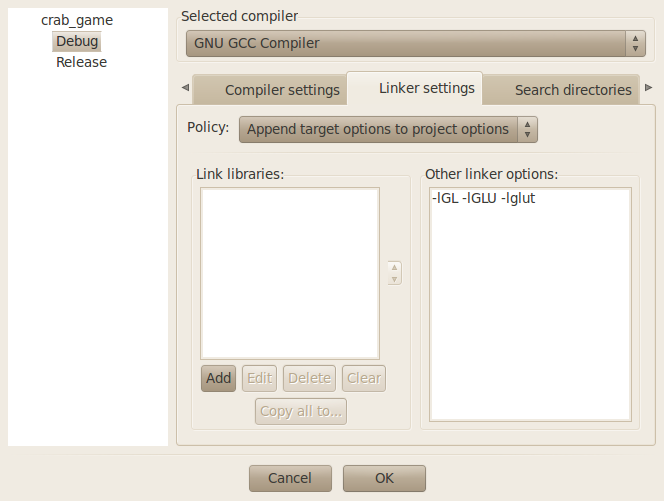
As you can see. I got it work.
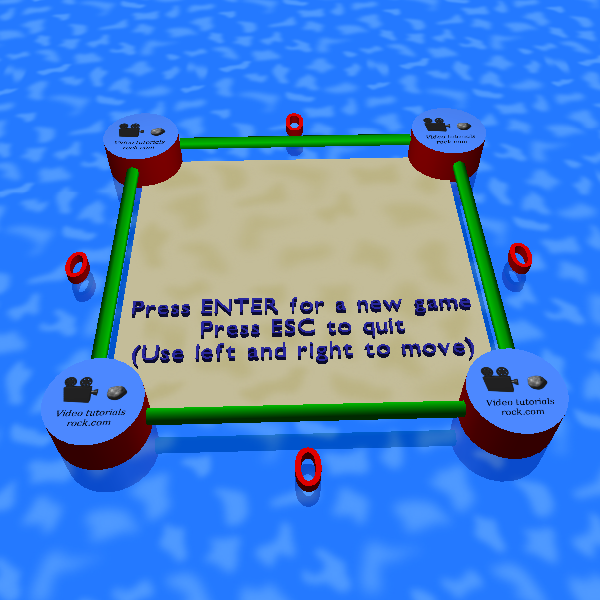
Now, I need to study how this ticks and see if I can hack it up a bit to turn it into a game for my kid…
My progress on my little mill project has been slowed of late my distraction and indecision.
My tuning resistors came this week as well as some insulating board that I want to mount my stepper motors on.
At the moment, I’m sort of looking at my next steps for Spindle Drive.. I’ve been done preliminary research on this stuff and I guess the Sherline drives are controlled by a KBIC controller from Kb Electronics. Speed can be controlled via a potentiometer or by controlling a voltage.
I found an interesting post here.. http://www.wallacecompany.com/machine_shop/kbic/
I guess a lot of people will take a pwm signal generated from there controller software and convert it to a voltage and plug it into their kbic.
The link up above claims that for the same price I could just go with PWM.
Since the mill came to me only with steppers and spindle drives, I wonder if getting a kbic is the best solution to me. In the back of my mind is that steppers are a first step and servos would be a second. I think I need to see what people are doing driving there sherline motors with non-kbic solutions. A little more research is needed here.
I’ve been finding myself using my thumb drive an awful lot lately. My C++ instructor requested that homework be zipped up before being submitted to him.
I find myself bouncing between windows and linux at home and windows everywhere else…
Soo…. I want to see if I can compress my assignments into a zip file Linux unto my thumb drive and see if I can unzip on the windows side of things.
I found some interesting references here:
http://www.cyberciti.biz/tips/how-can-i-zipping-and-unzipping-files-under-linux.html
and here:
http://linuxcommando.blogspot.com/2007/12/how-to-mount-usb-flash-drive-from.html
So reading this, there is a terminal way of doing things and a gui. Since, I’m more of the gui kind of guy, I thought I go that route first.
First things first, I wonder what happens if I just go to the synaptic repository and search on ZIP and see what happens:
Ok… I popped up a program called zip… When I typed in ZIP and Gnome, I get file-roller which was mentioned in the first reference I had.
Hmm.. I seems to be installed already…. I don’t remember doing that… Lets try the re-install and see what happens.
Ok. I when to Place->Home Folder when to my home folder and clicked to my folder on my thumbdrive with my homework to be submitted.
I held the shift down and left clicked the files I wanted to zip.
Then right click and select compress. I select “zip as an option, renamed the file and clicked on create.
Darn…. that was just way too easy…
Forget that creating mounts etc… from the terminal… It’s done. Time to test out and made sure it works out on the windows side of things.
All is well…. Files look a little weird when they open up in notepad, but look fine in wordpad… We’re good…
So… I just started my advance C++ class at my local community college.
The book being used for the class is Data Structures with C++ using STL by William Ford and Willam Top.
The book isn’t what I call an easy read and if this was something I had no prior exposure to I think I’d be in a panic. But, I’ve paged through the chapters and with most code seems understandable. I’m really looking forward to this class since I think it will fill in the estoteric gaps in my C++ knowledge.
Anyway, I start getting hung up on the very first assignment… ;(Because of family scheduling conflicts, I’m have to bug out of the class when the lab portion starts so I was on my own figuring this out instead of asking the instructor.)
So the assignment was Chapter 1, problem 21. The Hilow game. Easy I thought, compared to the Hell that I’ve gone looking at constraints in Heekscad this is nothing.
I thought, ok… a project with a main.cpp, hilow.h, hilow.cpp and d_random.h. Everything looks right except I get this weird LNK2005 linker error in visual studio express… Oddly enough, I run into a lot of errors, but this one was one that I haven’t run across yet.
A little googling takes me to here ( http://www.gamedev.net/topic/559843-cpplnk2005-error )
Hey… at least I’m not alone in the universe.
Basically I got taken to this link (http://archive.gamedev.net/reference/programming/features/orgfiles/ which had a really nice explanation as to what was causing my pain as well as some usefull trips on how (as well as why) to create re-usable code.
The long and short of it, I think the root cause of my problem was that implementation code was rolled into the header file, which caused me a bunch of problems when I tried link the code because of multiple definitions. In order to get around this problem, I basically got rid of my main.cpp file and rolled my main() call into hilo.cpp and low and behold problems went away.
I wonders if the authors of the book constructed their code so it sort of limited its use, since it forces you to keep your main() and what your working on in the source file.
Anyway.. I need to put the finishing touches on this assignment.
I some sort of interested in crunching some numbers to see what I got here.
I checked my with a thread gauge and it has a pitch of 20 threads per inch.
I measured the lead of the thread with an indicator as .050 “/Rev
The step_angle on the motor is 1.8 degrees/Step
Lets see if I can dust off my dimensional analysis stuff here.
I found a really interesting thread here at http://www.eng-tips.com/viewthread.cfm?qid=136950&page=1
This isn’t difficult,but I’m having a brain fart here”
“Pitch is the distance between adjacent thread forms or lead divided by number of starts”
| lead (Inch/Rev) | |
| Pitch(Inch/thread)= | ———————- |
| starts(Thread/Rev) |
(Initially I thought I had a muli-start lead screw but it turns out its only single start.)
Pitch X Starts = Lead(Inch/Rev)
| Lead (Inch) | Step_Angle(Degrees) | 1 Rev | |||
| Linear_step_increment (Inch/Step) = | ——————- | X | —————————– | X | ————— |
| (Rev) | (Step) | 360 Degrees |
For a multi-start thread this would be:
| Pitch (Inch) | Starts(Thread) | Step_Angle(Degrees) | 1 Rev | |||||
| Linear_step_increment (Inch/Step) | = | ——————- | X | ——————- | X | —————————– | X | ————– |
| (Thread) | (Rev) | (Step) | 360 Degrees |
So for my machine
Linear_step_increment = ( (.05 /*1.8)/360 = 0.00025 inch per step
Resolution isn’t to shabby with full step. So… I think microstepping for me is going to be more of an issue with reducing resonance than positional accuracy.
Just to work this out a bit more. According to here
The linistepper and the resulting linear step displacement would be as follows.
200 (full step) 0.00025 Inch/Step
400 (high-torque half step) 0.000125 Inch/Step
1200 (microstep 6th 0.0000417 Inch/Step
3600 (microstep 18th) 0.0000139 Inch/Step
I think that 1/2 step would be fine for my purposes but I suppose taking advantage 1/6 step would be handy if I run into resonance issues.
Positional accuracy is not going to be an issue, but the big problem is going to be speed on the rapid movements
According to the linistepper http://www.piclist.com/techref/io/stepper/linistep/lini_use.htm if I optimize for power consumption, I could expect out 4 Rev/Second out of my steppers.
Originally, I thought I was going to optimize my PSU for power consumption but I’m rethinking this strategy.
I need to go from Rev/Second to IPM
| 12 Inch | 4 Rev | 60 Sec | .050 Inch | |||
| ———- | = | ———- | X | ———– | X | ————- |
| Minute | Sec | Min | Rev |
So that’s really really slow…
I found this line in the reference:
The amount of PSU voltage you need is determined by the application. In most cases a voltage of 3x the rated motor voltage will give decent performance through the main resonances up to 10 or 15 revs/second
Ok that’s sort of made the decision for me.
My x-y motors are rate at 6V 1.2 amps/phase
My z-axis motors are rated at 5.4 V 1.5 amps/phase
Rotary Axis motor tbd.
I’m not sure I want to go nuts trying to push a lot of voltage motors but I think using a 12 Volt At power supply is not unreasonable.
So… going to How to “tune” it to suit special needs!
Ignoring the rotary (since I don’t own one at the moment) I’m estimating my PSU requirements will be around:
| X-axis | 1.2 | X | 2 | 2.4 | |
| Y-axis | 1.2 | X | 2 | 2.4 | |
| Z-axis | 1.5 | X | 2 | 3 | |
| Rotary axis | ? | ||||
| cooling fans | 0.24 | X | 4 | 0.96 | |
| 8.76 | Amps | ||||
| 105.12 | Watts |
Thats a little bit of a bummer, I had a PC power supply rate at 12 Volts 6 amps. I having a feeling that this is probably will be ok with usage(Whats the possibility of running all axi simultaneously at full power. I my inclination is to look with something with a bit more oomph to be conservative.
Another this I need to add to my shopping list are fuses.
I found this quote in how to “Tune” to suit…..
A slow-blow fuse rated about 2.5x the max normal phase current (if motor is 1 amp/phase use a 2.5 amp slow blow fuse placed before the linistepper) Fuses are always a good idea!
For me this work out to:
| X-axis Fuse | 1.2 | X | 2.50 | 3 | Amps |
| Y-axis Fuse | 1.2 | X | 2.50 | 3 | Amps |
| Z-axis Fuse | 1.5 | X | 2.50 | 3.75 | Amps |
| Rotary | ? |
Now I might as well do some current optimization for my lini-steppers.
On the How to “tune” it to suit special needs! section titled “changing current” there is a calculator
For my 1.5 amp solution I got a perfect match:
Results of resistor set search.
Target Resistance for your current requirement of 1.5 Amps is 0.6666666666666666 Ohms
At the full current, this will dissipate a total of 1.5 Watts over all the resistors, but each resistor will dissipate a different amount, shown in (), depending on it’s value.Tolerance on search = 1% null (Found 158 sets within tolerance)
The closest match is 1 Ohms @1W paralleled with 2 Ohms @0.5W which is perfect.
For my 1.2 amp drives. This is going to get ugly:
Results of resistor set search.
Target Resistance for your current requirement of 1.2 Amps is 0.8333333333333334 Ohms
At the full current, this will dissipate a total of 1.2 Watts over all the resistors, but each resistor will dissipate a different amount, shown in (), depending on it’s value.Tolerance on search = 1% null (Found 315 sets within tolerance)
The closest match is 1 Ohms @1W paralleled with 7.5 Ohms @0.133W paralleled with 15 Ohms @0.066W which is perfect.
I decided to try the site referenced at this calculator
http://www.computertorture.com/noncompliant/parallel/index.html
And got this result:
Target Resistance = 0.8333333333333334 Ohms
Tolerance on search = 1% (Found 2 pairs within tolerance)
The closest match is 1.2 Ohms paralleled with 2.7 Ohms at only -0.31% out
| First (Ohms) | Second (Ohms) | Paralleled result (Ohms) | Deviation (%) |
| 1 | 5.1 | 0.83 | +0.32 |
| 1.2 | 2.7 | 0.83 | -0.31 |
This is basically my shopping list of things I need for this project:
| Need to get list | |
| power supply | 8.76 amps 12 Dc with 5 Volt |
| Project Enclosure | Qty (1) Enclosure |
| Mounting plate? | Qty (1) plate to mount 4 lini’s |
| 4 Linisteppers 3 per | Qty(12) Standoff |
| x&y axis | Qty (2)-3amp Fuses/Fuse holders |
| z axis | Qty (1)-3.75amp Fuses/Fuse holders |
| Connectors for cooling fans | Qty(5) |
| Z axis For 1.5 amp current sense resistors | Qty (2) 2 Ohm (1 Watt Min Rating |
| X and Y axis current sense | Qty (4) 7.5 Ohms (.266W <Min rating) |
| X and Y axis current sense | Qty (4)-15 Ohms (.132 W Min rating) |
Lets see what am I forgetting.
Oh yeah… I need a speed controller, and a solenoid with for my Spindle motor and at least consider optical isolation.
If anyone is curious my new old sherline line sort of looks like this:
http://www.chaski.com/homemachinist/viewtopic.php?f=9&t=77690&view=previous
Ok… I’m very exited that I have 3 of my 4 linisteppers working very nicely. On my forth, I had soldered the resistors next the the diodes in the wrong hole. (For the moment, that drive is intended for a 4 axis (rotary table that I don’t have yet so this isn’t what I’d call in the critical path.))
So I have my first motor wired up and I wanted to make sure that it was running in the correct direction.
Well, I found this reference http://www.steppermotors.us/stepper_motor_glossary.htm
Which states:
Direction of Rotation The direction the shaft rotates when viewed from the mounting shaft end. The “standard” (positive) direction is defined as counterclockwise.
So now I need the direction setting on the linistepper. http://www.piclist.com/techref/io/stepper/linistep/lini_use.htm
I’m using a 555 pulse generator that is similar to this. http://www.piclist.com/techref/555kitbuild.htm
So it appears that if I’m in full step mode and running opposite of “reverse” Forward? The switches should be all in the same direction. (At the moment, my PCU doesn’t really have high enough voltage I suspect, since I seem to have issues running in microstep mode.)
Ok… One last note.
I found this page very useful in wiring my motor up.
http://www.piclist.com/techref/io/stepper/wires.htm
Hot darn… It looks like I got my 6 wire stepper for my z axis wired up correction on the first try…. You got love that. Time to solder on the connector.