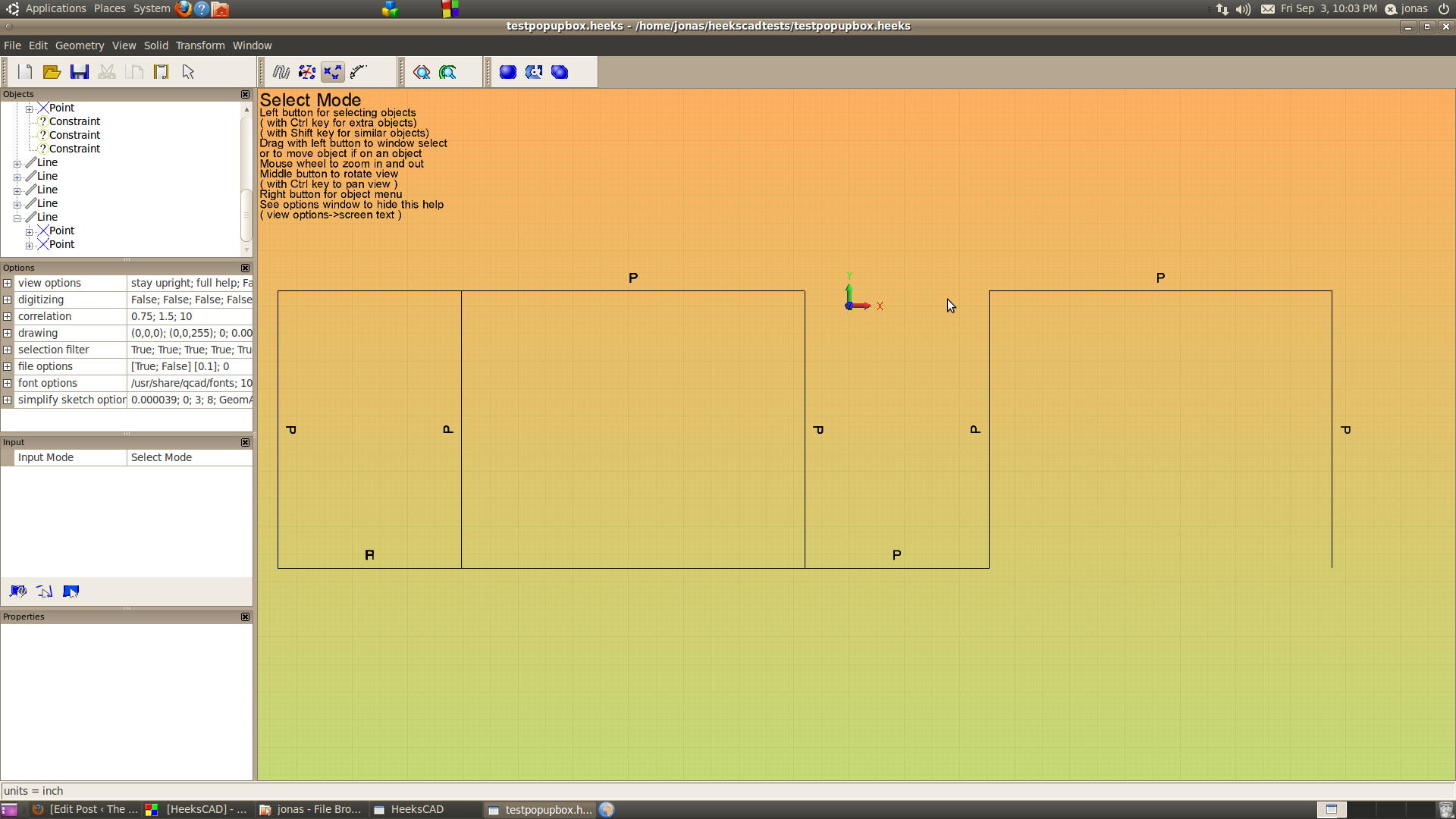
Isolation of the “AbsoluteAngleConstraint” bug.

I had some meetings after work tonight and need to get to bed.

Jon Pry was kind enough to take a look at what was going on this little bug of mind that has been causing me pain.
Apparently, it has something to do with MergeCommonObjects is causing some of the issues:

I think He said that if I “//” out the following lines (919-922 in HeeksCAD.cpp) the problems goes away:

// where operations are pointing to the same sketch, for example, make sure that they are not duplicated sketches
for (std::list::iterator itObject = objects.begin(); itObject != objects.end(); itObject++)
{
*itObject = MergeCommonObjects( unique_set, *itObject );
}

Ok… I’m game… Lets see what happens.
I just drew a cube. set vertical and horizontal constraints and it worked…. Hot darn… Back to the project for my wife…. and see if I can bust this software..

Posted in Uncategorized | Leave a comment

Attempting to isolate the “AbsoluteAngleConstraint” bug.

I was talking to Dan Heeks in the IRC and he seems to think that the problem is somewhere here: http://code.google.com/p/heekscad/source/browse/trunk/src/Constraint.cpp#332
Dan submitted http://code.google.com/p/heekscad/source/detail?r=1285
It seem like he was in a hurry, and unforturnately his fix didn’t do the trick.  I’ve been pounding on this solver for a few days trying to understand how it works and it feels like the core code is rock solid.
Any I’m pretty sure there are two bugs at work here.  I think Dan Heeks targeted the area of what was wrong..  Hmm.  I took a C++ class I wonder if I can figure it out.
It using my test 2 file http://code.google.com/p/heekscad/issues/detail?id=304

Experiment #1: Failed

<HeeksCAD_Document>

<Sketch title=”Sketch” id=”1″>

<Line col=”0″ id=”1″>
<Point col=”0″ x=”-45.5″ y=”-7″ z=”0″ id=”1″/>
<Point col=”0″ x=”-45.5″ y=”17.75″ z=”0″ id=”2″/>
</Line>

<Line col=”0″ id=”2″>
<Point col=”0″ x=”-45.5″ y=”17.75″ z=”0″ id=”3″/>
<Point col=”0″ x=”-14.5″ y=”17.75″ z=”0″ id=”4″/>
</Line>

<Line col=”0″ id=”3″>
<Point col=”0″ x=”-14.5″ y=”17.75″ z=”0″ id=”5″/>
<Point col=”0″ x=”-14.5″ y=”-7″ z=”0″ id=”6″/>
</Line>

<Line col=”0″ id=”4″>
<Point col=”0″ x=”-14.5″ y=”-7″ z=”0″ id=”7″/>
<Point col=”0″ x=”-45.5″ y=”-7″ z=”0″ id=”8″/>
</Line>
</Sketch>
<Constraint type=”CoincidantPointConstraint” angle=”AbsoluteAngleHorizontal” length=”0″ obj1_id=”8″ obj1_type=”2″ obj2_id=”1″ obj2_type=”2″ id=”4″/>
<Constraint type=”CoincidantPointConstraint” angle=”AbsoluteAngleHorizontal” length=”0″ obj1_id=”2″ obj1_type=”2″ obj2_id=”3″ obj2_type=”2″ id=”1″/>
<Constraint type=”AbsoluteAngleConstraint” angle=”AbsoluteAngleVertical” length=”0″ obj1_id=”1″ obj1_type=”3″ id=”5″/>
<Constraint type=”CoincidantPointConstraint” angle=”AbsoluteAngleHorizontal” length=”0″ obj1_id=”4″ obj1_type=”2″ obj2_id=”5″ obj2_type=”2″ id=”2″/>
<Constraint type=”AbsoluteAngleConstraint” angle=”AbsoluteAngleHorizontal” length=”0″ obj1_id=”2″ obj1_type=”3″ id=”6″/>
<Constraint type=”CoincidantPointConstraint” angle=”AbsoluteAngleHorizontal” length=”0″ obj1_id=”6″ obj1_type=”2″ obj2_id=”7″ obj2_type=”2″ id=”3″/>
<Constraint type=”AbsoluteAngleConstraint” angle=”AbsoluteAngleVertical” length=”0″ obj1_id=”3″ obj1_type=”3″ id=”7″/>
<Constraint type=”AbsoluteAngleConstraint” angle=”AbsoluteAngleHorizontal” length=”0″ obj1_id=”4″ obj1_type=”3″ id=”8″/>

</HeeksCAD_Document>

I suspected the problem might be with the overloaded constructor firing.
I but a break point in all the constructors and I drew a line and set the vertical constraint.

This Constructor function fired:
Constraint::Constraint(EnumConstraintType type,EnumAbsoluteAngle angle, ConstrainedObject* obj)

In the source constraint.cpp, HeeksObj* Constraint::ReadFromXMLElement(TiXmlElement* pElem)
Constraint(etype,eangle,length,obj1,obj2)

Ok.. I hacked the code a bit to get the same constructor to fire with no success. Now this is a more than a little irritating.  I know that AbsoluteAngleHorizontal can me set when manually drawing. So… I think the more that I make the file read look like the manual drawing, it will sooner or later work… Right?????
I think I need to start documenting the experiments:

HeeksObj* Constraint::ReadFromXMLElement(TiXmlElement* pElem)
{
const char* type=0;
EnumConstraintType etype=(EnumConstraintType)0;
const char* angle=0;
EnumAbsoluteAngle eangle=(EnumAbsoluteAngle)0;
double length=0;
int obj1_id=0;
int obj2_id=0;
int obj1_type=0;
int obj2_type=0;
ConstrainedObject* obj1=0;
ConstrainedObject* obj2=0;
// get the attributes
std::string type_name = “”; //THIS IS A JT HACK
for(TiXmlAttribute* a = pElem->FirstAttribute(); a; a = a->Next())
{
std::string name(a->Name());

if(name == “type”){
type = a->Value();
type_name =a->Value();//THIS IS A JT HACK
}

else if(name == “angle”){angle = a->Value();}
else if(name == “length”){length = a->DoubleValue();}
else if(name == “obj1_id”){obj1_id = a->IntValue();}
else if(name == “obj1_type”){obj1_type = a->IntValue();}
else if(name == “obj2_id”){obj2_id = a->IntValue();}
else if(name == “obj2_type”){obj2_type = a->IntValue();}
}

//Ugh, we need to convert the strings back into types
for(unsigned i=0; i < sizeof(ConstraintTypes); i++)
{
if(strcmp(ConstraintTypes[i].c_str(),type)==0)
{
etype = (EnumConstraintType)i;
break;
}
}

for(unsigned i=0; i < sizeof(AbsoluteAngle); i++)
{
if(strcmp(AbsoluteAngle[i].c_str(),angle)==0)
{
eangle = (EnumAbsoluteAngle)i;
break;
}
}

//Get real pointers to the objects
obj1 = (ConstrainedObject*)wxGetApp().GetIDObject(obj1_type,obj1_id);
obj2 = (ConstrainedObject*)wxGetApp().GetIDObject(obj2_type,obj2_id);

// JT HACKS JST
if (type_name== “AbsoluteAngleConstraint”){
//Constraint *cAbs = new Constraint(obj1);
//if(obj1)obj1->constraints.push_back(cAbs);
obj1->SetAbsoluteAngleConstraint(eangle);
}
else
{
Constraint *c = new Constraint(etype,eangle,length,obj1,obj2);

if(obj1)obj1->constraints.push_back(c);
if(obj2)obj2->constraints.push_back(c);
}
//Don’t let the xml reader try to insert us in the tree
return NULL;

I thought for sure this would work but it didn’t ;(
I got this idea by setting the break point on all the Constraint constructors to see which one fired when I set a vertical in sketch mode when it fired by hitting ctrl-shift-F7 to step out of the function and see what triggered this.
“void ConstrainedObject::SetAbsoluteAngleConstraint(EnumAbsoluteAngle angle)”  fired ” constraints.push_back(new Constraint(AbsoluteAngleConstraint,angle,this));”
which was fired by
“class SetLineVertical:public Tool run() ” fired line_for_tool->SetAbsoluteAngleConstraint(AbsoluteAngleVertical);
which was fired by
void HeeksCADapp::on_menu_event(wxCommandEvent& event) t->Run();
which was fired by
void CGraphicsCanvas::OnMenuEvent(wxCommandEvent& event) fired wxGetApp().on_menu_event(event); (which I guess was the top event)

I guess time for experiment 2.  It looks like src/HLine.cpp is point wx opengl and opencascade converge. At this point, I don’t want to dig any deeper. This is where things get pretty heavy deeper. Maybe I can get something to work at this layer
Ok… this looks interesting
class SetLineVertical:public Tool{
public:
void Run(){
line_for_tool->SetAbsoluteAngleConstraint(AbsoluteAngleVertical);
SolveSketch((CSketch*)line_for_tool->Owner());

wxGetApp().Repaint();
}
const wxChar* GetTitle(){return _(“Toggle Vertical”);}
wxString BitmapPath(){return _T(“new”);}
const wxChar* GetToolTip(){return _(“Set this line to be vertical”);}
};

Experment#2: Failed
If wonder what will happen if I invoke sketchsolve at this point. What the heck… worth a try..
It seems that the coincident points constraints works, but my little experiment had no affect.
Oh… This sucks.

HeeksObj* Constraint::ReadFromXMLElement(TiXmlElement* pElem)
{
const char* type=0;
EnumConstraintType etype=(EnumConstraintType)0;
const char* angle=0;
EnumAbsoluteAngle eangle=(EnumAbsoluteAngle)0;
double length=0;
int obj1_id=0;
int obj2_id=0;
int obj1_type=0;
int obj2_type=0;
ConstrainedObject* obj1=0;
ConstrainedObject* obj2=0;
// get the attributes
std::string type_name = “”; //THIS IS A JT HACK
for(TiXmlAttribute* a = pElem->FirstAttribute(); a; a = a->Next())
{
std::string name(a->Name());

if(name == “type”){
type = a->Value();
type_name =a->Value();//THIS IS A JT HACK
}

else if(name == “angle”){angle = a->Value();}
else if(name == “length”){length = a->DoubleValue();}
else if(name == “obj1_id”){obj1_id = a->IntValue();}
else if(name == “obj1_type”){obj1_type = a->IntValue();}
else if(name == “obj2_id”){obj2_id = a->IntValue();}
else if(name == “obj2_type”){obj2_type = a->IntValue();}
}

//Ugh, we need to convert the strings back into types
for(unsigned i=0; i < sizeof(ConstraintTypes); i++)
{
if(strcmp(ConstraintTypes[i].c_str(),type)==0)
{
etype = (EnumConstraintType)i;
break;
}
}

for(unsigned i=0; i < sizeof(AbsoluteAngle); i++)
{
if(strcmp(AbsoluteAngle[i].c_str(),angle)==0)
{
eangle = (EnumAbsoluteAngle)i;
break;
}
}

//Get real pointers to the objects
obj1 = (ConstrainedObject*)wxGetApp().GetIDObject(obj1_type,obj1_id);
obj2 = (ConstrainedObject*)wxGetApp().GetIDObject(obj2_type,obj2_id);

// JT HACKS JST
if (type_name== “AbsoluteAngleConstraint”){
//Constraint *cAbs = new Constraint(obj1);
//if(obj1)obj1->constraints.push_back(cAbs);
obj1->SetAbsoluteAngleConstraint(eangle);
//line_for_tool->SetAbsoluteAngleConstraint(AbsoluteAngleVertical);
SolveSketch((CSketch*)obj1->Owner());

}
else
{
Constraint *c = new Constraint(etype,eangle,length,obj1,obj2);

if(obj1)obj1->constraints.push_back(c);
if(obj2)obj2->constraints.push_back(c);
}
//Don’t let the xml reader try to insert us in the tree
return NULL;

I need to step away from this for a while..

Posted in Uncategorized | Leave a comment

Opps I volunteered myself.

I was in a hurry to file a bug report on the problems I was having with the parametric solver.
I didn’t mean to confirm the bug and assign it to myself….
Well…. I guess I should give it a whirl to see if I can figure out what’s going on.

Ok…Code wise it think  I need to start out here.

bool HeeksCADapp::OpenFile(const wxChar *filepath, bool import_not_open, HeeksObj* paste_into, HeeksObj* paste_before, bool retain_filename /* = true */ )

which will fires off
OpenXMLFile(filepath, paste_into, paste_before);

One of the guys on the IRC (thought the Heekscad the constraints in the file where writing out but not reading in..)  I guess thats a good theory to test.

There is something wanky going on here with the File Read/Save of constraints.   I thought I defined the problem but now I’m not so sure.  I think Heekscad is saving everything ok.  I believe the problem is in the reading back.

Tests:
1) Rectangle with with 4 CoincidentPointConstraints  and save as “test_1_4CoincidentPointConstraints.heeks”

2) With the same file open add a vertical and horizontal point constraint and save as “test_2_4CoincidentPointConstraints_2AbsoluteAngleConstraints.heeks”

3) Exit heekscad and restart. Open “test_2_4CoincidentPointConstraints_2AbsoluteAngleConstraints.heeks”  and save into “test_3_4CoincidentPointConstraints_2AbsoluteAngleConstraints_resaved.heeks”

4)Exit heekscad and restart. Open “test_1_4CoincidentPointConstraints.heeks” and save into “test_4_4CoincidentPointConstraints_resaved.heeks”

Observations:

(Test 1) It appears that test_1_4CoincidentPointConstraints.heeks has saved constraints correctly
(Test 2) Normal function occurs when “AbsoluteAngleConstraint” is added to a open file and saved.
(Test 3) The file with 4 AbsoluteAngleConstraint and 4 CoincidantPointConstraint are not read in properly. It appears that the AbsoluteAngleConstraint have not been read in properly.
I’m observing what appears to be a read file and a write file error.  When a file is opened, observed on the screen it appears that the AbsoluteAngleConstraint have been lost but the CoincidantPointConstraint have been read. What is exceeding curious when this file is save 3 of the 4 CoincidantPointConstraint are lost. My theory that on a fresh drawing everything everything saves correctly but things get weird with and existing drawing. It appears that there is a read bug and a write bug saving constraints.

(Test 4) In this test a open 4 lines constrained by the endpoints only. On the screen it appears that everything reads in properly. The endpoints appear constrained properly.  When this datafile is saved 3 of the 4 point constraints are lost.

Hypothesis:
It seems as if normal function occurs on new data drawing.  It appears that data is saving correctly at this point.
It appears that there are read and write errrors related to constraints on an existing drawing.

I could be off on this but I looks as there are two error paths:
AbsoluteAngleConstraints are not being read
A counter error? is occuring when data comes from a existing file not all is being read back.

Well my daughter is about to wake up and that’s going to be the end of the quiet.   Lets see if I can get some help on this.

test_1_4CoincidentPointConstraints.heeks

<?xml version=”1.0″ encoding=”UTF-8″ ?>
<HeeksCAD_Document>
<Sketch title=”Sketch” id=”1″>
<Line col=”0″ id=”1″>
<Point col=”0″ x=”-41″ y=”-5.5″ z=”0″ id=”1″ />
<Point col=”0″ x=”-40″ y=”20″ z=”0″ id=”2″ />
</Line>
<Line col=”0″ id=”2″>
<Point col=”0″ x=”-40″ y=”20″ z=”0″ id=”3″ />
<Point col=”0″ x=”-14″ y=”17″ z=”0″ id=”4″ />
</Line>
<Line col=”0″ id=”3″>
<Point col=”0″ x=”-14″ y=”17″ z=”0″ id=”5″ />
<Point col=”0″ x=”-16″ y=”-2″ z=”0″ id=”6″ />
</Line>
<Line col=”0″ id=”4″>
<Point col=”0″ x=”-16″ y=”-2″ z=”0″ id=”7″ />
<Point col=”0″ x=”-41″ y=”-5.5″ z=”0″ id=”8″ />
</Line>
</Sketch>
<Constraint type=”CoincidantPointConstraint” angle=”AbsoluteAngleHorizontal” length=”0″ obj1_id=”8″ obj1_type=”2″ obj2_id=”1″ obj2_type=”2″ id=”4″ />
<Constraint type=”CoincidantPointConstraint” angle=”AbsoluteAngleHorizontal” length=”0″ obj1_id=”2″ obj1_type=”2″ obj2_id=”3″ obj2_type=”2″ id=”1″ />
<Constraint type=”CoincidantPointConstraint” angle=”AbsoluteAngleHorizontal” length=”0″ obj1_id=”4″ obj1_type=”2″ obj2_id=”5″ obj2_type=”2″ id=”2″ />
<Constraint type=”CoincidantPointConstraint” angle=”AbsoluteAngleHorizontal” length=”0″ obj1_id=”6″ obj1_type=”2″ obj2_id=”7″ obj2_type=”2″ id=”3″ />
</HeeksCAD_Document>

test_2_4CoincidentPointConstraints_and_4AbsoluteAngleConstraints.heeks

<?xml version=”1.0″ encoding=”UTF-8″ ?>
<HeeksCAD_Document>
<Sketch title=”Sketch” id=”1″>
<Line col=”0″ id=”1″>
<Point col=”0″ x=”-45.5″ y=”-7″ z=”0″ id=”1″ />
<Point col=”0″ x=”-45.5″ y=”17.75″ z=”0″ id=”2″ />
</Line>
<Line col=”0″ id=”2″>
<Point col=”0″ x=”-45.5″ y=”17.75″ z=”0″ id=”3″ />
<Point col=”0″ x=”-14.5″ y=”17.75″ z=”0″ id=”4″ />
</Line>
<Line col=”0″ id=”3″>
<Point col=”0″ x=”-14.5″ y=”17.75″ z=”0″ id=”5″ />
<Point col=”0″ x=”-14.5″ y=”-7″ z=”0″ id=”6″ />
</Line>
<Line col=”0″ id=”4″>
<Point col=”0″ x=”-14.5″ y=”-7″ z=”0″ id=”7″ />
<Point col=”0″ x=”-45.5″ y=”-7″ z=”0″ id=”8″ />
</Line>
</Sketch>
<Constraint type=”CoincidantPointConstraint” angle=”AbsoluteAngleHorizontal” length=”0″ obj1_id=”8″ obj1_type=”2″ obj2_id=”1″ obj2_type=”2″ id=”4″ />
<Constraint type=”CoincidantPointConstraint” angle=”AbsoluteAngleHorizontal” length=”0″ obj1_id=”2″ obj1_type=”2″ obj2_id=”3″ obj2_type=”2″ id=”1″ />
<Constraint type=”AbsoluteAngleConstraint” angle=”AbsoluteAngleVertical” length=”0″ obj1_id=”1″ obj1_type=”3″ id=”5″ />
<Constraint type=”CoincidantPointConstraint” angle=”AbsoluteAngleHorizontal” length=”0″ obj1_id=”4″ obj1_type=”2″ obj2_id=”5″ obj2_type=”2″ id=”2″ />
<Constraint type=”AbsoluteAngleConstraint” angle=”AbsoluteAngleHorizontal” length=”0″ obj1_id=”2″ obj1_type=”3″ id=”6″ />
<Constraint type=”CoincidantPointConstraint” angle=”AbsoluteAngleHorizontal” length=”0″ obj1_id=”6″ obj1_type=”2″ obj2_id=”7″ obj2_type=”2″ id=”3″ />
<Constraint type=”AbsoluteAngleConstraint” angle=”AbsoluteAngleVertical” length=”0″ obj1_id=”3″ obj1_type=”3″ id=”7″ />
<Constraint type=”AbsoluteAngleConstraint” angle=”AbsoluteAngleHorizontal” length=”0″ obj1_id=”4″ obj1_type=”3″ id=”8″ />

</HeeksCAD_Document>

test_3_4CoincidentPointConstraints_and_4AbsoluteAngleConstraints_resaved.heeks

<?xml version=”1.0″ encoding=”UTF-8″ ?>
<HeeksCAD_Document>
<Sketch title=”Sketch” id=”1″>
<Line col=”0″ id=”1″>
<Point col=”0″ x=”-50″ y=”-9.5″ z=”0″ id=”1″ />
<Point col=”0″ x=”-50.5″ y=”18.75″ z=”0″ id=”2″ />
</Line>
<Line col=”0″ id=”2″>
<Point col=”0″ x=”-50.5″ y=”18.75″ z=”0″ id=”3″ />
<Point col=”0″ x=”-16.5″ y=”18.75″ z=”0″ id=”4″ />
</Line>
<Line col=”0″ id=”3″>
<Point col=”0″ x=”-16.5″ y=”18.75″ z=”0″ id=”5″ />
<Point col=”0″ x=”-16″ y=”-9.5″ z=”0″ id=”6″ />
</Line>
<Line col=”0″ id=”4″>
<Point col=”0″ x=”-16″ y=”-9.5″ z=”0″ id=”7″ />
<Point col=”0″ x=”-50″ y=”-9.5″ z=”0″ id=”8″ />
</Line>
</Sketch>
<Constraint type=”CoincidantPointConstraint” angle=”AbsoluteAngleHorizontal” length=”0″ obj1_id=”8″ obj1_type=”2″ obj2_id=”1″ obj2_type=”2″ id=”0″ />
</HeeksCAD_Document>

test_4_4CoincidentPointConstraints_resaved.heeks

<?xml version=”1.0″ encoding=”UTF-8″ ?>
<HeeksCAD_Document>
<Sketch title=”Sketch” id=”1″>
<Line col=”0″ id=”1″>
<Point col=”0″ x=”-45″ y=”-12.5″ z=”0″ id=”1″ />
<Point col=”0″ x=”-42″ y=”24″ z=”0″ id=”2″ />
</Line>
<Line col=”0″ id=”2″>
<Point col=”0″ x=”-42″ y=”24″ z=”0″ id=”3″ />
<Point col=”0″ x=”-6″ y=”20″ z=”0″ id=”4″ />
</Line>
<Line col=”0″ id=”3″>
<Point col=”0″ x=”-6″ y=”20″ z=”0″ id=”5″ />
<Point col=”0″ x=”-10″ y=”-10″ z=”0″ id=”6″ />
</Line>
<Line col=”0″ id=”4″>
<Point col=”0″ x=”-10″ y=”-10″ z=”0″ id=”7″ />
<Point col=”0″ x=”-45″ y=”-12.5″ z=”0″ id=”8″ />
</Line>
</Sketch>
<Constraint type=”CoincidantPointConstraint” angle=”AbsoluteAngleHorizontal” length=”0″ obj1_id=”8″ obj1_type=”2″ obj2_id=”1″ obj2_type=”2″ id=”0″ />
</HeeksCAD_Document>

Posted in Uncategorized | Leave a comment

What a tease with the Heekscad parametric equation solver

I spent the evening drawing out by had a pop up box that would open up on a 45 with a top….  After about 4-5 iterations I finally got…. So the next step was to move it to Heekscad and put it in the equation solver.
I was getting the hang of it and I thought I was done….  Basically I could resize a length and the whole box layout would automatically generate.  This thing is amazing.

Then I got a segmentation fault… (hey it happens) when I re-opened all the contraints that I had spent hours on where lost… ;(

Oh well… My life schedule has just slipped a bit.    I had one of the guys on the IRC check it out for me to confirm I was not only get this behavior…

Not the worst thing in the world.  I need to see if this is a bug that has been filed.  But time to get some sleep.

Posted in HeeksCad, pop-up card stuff | Leave a comment

DXF Kiss Cut challenges/ using a vibro-etcher to cut card stock.

One of the things that I have been thinking about doing is setting up a parametric equations using heekscad for a generic pop-up shape export it out to DXF for direct import into my sisters pazzle inspiration software.

The idea was to have a model layout and then automatically re-generated the shape wider or flatter merely by changing a couple of key parameters.    From my preliminary experiments I’m fairly confident that this can be done in heekscad.  I’ve run into a couple of technical snags on the DXF export though as far as these Kiss cuts.

On the Heekscad side of things, I don’t think the sketcher can do different line styles at this point.  I’m still researching that one.   Part of the beauty of open source code is that if I really really really wanted that feature I could add that feature in the source myself. But as it turns out it doesn’t really matter for this project anyway.

I called the Pazzle’s tech support to inquire about whether kiss cuts could be somehow imported via a DXF.  The answer is no.    Apparently, the software was outsourced  and I was left with the impression that they weren’t very keen on making enhancements to a DXF file import.  When I made the comment that they are loosing market share not having this feature, her comment was “no one has ever asked for this before”.   It seems I get this comment alot in life…
I guess this answer sort  of irked the engineer in me and it really shouldn’t have.   This machine is really designed for home use and not a production environment.   Apparently it works fine for the target demographic who apparently ain’t me.

For my little project that I’m working on, I guess I’m going to have to figure out how to put change the linestyle manual in the Pazzles software after I do a DXF import.  If I were to go into the pop-up business I wouldn’t be doing this.

On a side note, I have the carcass of a decommissioned sears radial arm saw that I have in my shop that is just too good to throw out and I’ve been trying to figure out what to do with.  Basically I got a 100 bucks for decommissioning it. See http://www.radialarmsawrecall.com/.    It was a really nice piece of old iron, just had some safety issues.      Initially my thoughts was to turn it into an overhead CNC router/mill.  This thing is solid 1960’s (I think) cast iron, but still I thought the radial arm would have some flex.    Then I ran across the reprap project.  This carcass would be ideal for that (no side loads)  Part of the decommissioning of this saw was that I needed to turn in the carriage to get the bucks.  I’ve actually built a new carriage built with a reprap in mind but I thinking about this a bit, it would be a big deal to modify this thing to cut paper.   (I’m at the point where I need to machine the Arm to mount pulleys and a stepper).  The pazzles system uses a sticky matt and I knife type cutting actions.

I wonder….. I have a vibro-etcher… I wonder if that could be used to cut paper… Time for a quick experiment…
Just back from the shop….  I really got to clean up down there.  It took me a while to find my vibroetcher.  It seems  card stock cuts out  just fine using a vibroetcher.  Sure not as crisp as a knife cut but I bet if I played around with it I could get it to come out just fine. I’m thinking that I could mount this in my eventual version of a radial arm saw reprap and have a cnc paper cutter has a bonus.  I believe the beauty of using the vibro-etch method is that I don’t think you’ll need sticky paper since there are no side loads in the cutting action….  (If anyone tries patenting this….. Hey world you heard it here first and this idea is being given away) (Hope I don’t regret this)

Back on the project side of things.    This popup stuff is really intriguing.  I wanted to had a background that pops up but it’s colliding with my what’s going to be my model piano.   Just a problem that needs to be solved.   I need to take a another trip to borders check out the pop-ups again.  I’m at the kindergarten level on this pop-up card stuff and the stuff in the kids section at Borders is grad school kind of  stuff.

Posted in HeeksCad, pop-up card stuff | Leave a comment

Doing a little pop-up card research

My sister had suggested that I go to boards to take a look at the pop-up cards that they had at Borders.  My daughter and I went for a trip.

My plan was initially to look for a book on pop-up while my daughter was looking at the toy section.  It turns out the only book on pop-up was on that I had taken out from the library.  Anyway it hadn’t occurred to me but book stores do sell pop-up books.  It worked out well for everyone.  My daughter got a magic box kit (which made her very happy) and I got to study the art and mechanics of a bunch of pop-up books that were frankly inspiring.  (The only downside was the some of the  display books where beat on pretty bad and no longer functioned properly).   It’s sort of a shame that my daughter is at an age where pop-up reading books aren’t that exiting to her any more… When she was little, one of her favorite’s was Alpha bugs..  It looks like there is a more advanced version out there which was sort of fun to go through and reminiscence with her.  The technical feats that are in some of these books are darn impressive.    I wish sheckels were not so tight.   I would have bought a bunch of these masterpieces and took them home to study in more detail.  I was suffering from a bit of brain overload with amount of clever  mechanisms I saw there.  It seems almost as there is a bit of competition going on there as far books seeming to want to out compete each other on spectacular effects.

After we were done in the toy section we had some fun checking out the pop-up card display that they had there.  Oddly enough this appears to be more appealing to a seven year old than a pop up book.  On the down side these cards basically only unfold 90 degrees, while what I’m interested in doing is at 180.   Most of the cards had a little pull tab that would have the model do something.  I need to think on this some more, but that would be sort of cool for my little project.

I think it’s about time that I start working on the Mark II prototype.  This time instead of copy paper I think I’m going to use card-stock.

Posted in pop-up card stuff | Leave a comment

Road trip results on the heekscad dxf to pazzle inspiration experiment.

The road trip out to my sister’s was interesting and fruitful. I got to test out my Heekscad generated DXF file to import to the Pazzles software it exposed some issues I need to work through. These are necessarily problems with anyone’s software just as I said thinks I got to work out.

  • Need to make sure that the image is scaled to fit on the paper (big duh) Pazzle software had scale feature which let me scale to fit

The paper is mounted on a thick (~.03″ ) plastic sheet (aka “cutting matt”) which has a 3m post it type of adhesive on it.  This basically keeps your work  from doing weird things when you cut around it.  There is about a 1/4″ -1/2 non-sticky  margin where the main drive rollers ride on which advance the sheet.  Really a clever arrangement.

The kinematics of the Pazzles Inspiration sort of remind me of the old HP7475 pen plotter.  The drive belt looks pretty thick which makes sense since this thing moves way slower and generates more forces as the inspiration cuts the paper with this needle tip cutter mounted on the carriage.  (I didn’t have time to take a good look at that).  The stepper motors seemed sort of loud to me.  I guess it does the job.  It didn’t sound like there was any micro-stepping going on there.

I was just blue skying  about how you could built a machine with out the sticky stuff solution.  Perhaps, a solid board with minute perforations which would hold the paper to the board via vacuum?  As my mind wanders sipping my morning coffee, I wonder how production die-cutting works.. (another topic for another day…. back on task boy….)

I had not really thought about how to create a fold line.  There are a couple of different ways of doing this.  The method that is use by the Pazzles software is to basically generate a hidden line ( aka ” –  –  –  –  –  – “) which the Pazzles Inspirations can generate.   In the paper crafting lingo this is called a “kiss cut”. My DXF test file had  non of this, but my sister had this WPC file (which is the native file for the Pazzle Inspiration) which would cut out this pie shaped container for a party favour.  This was interesting because it not only cut out the outline but also generated the fold lines.   At this point, I wanted ran an experiment, which led to some disappointing results.   I exported the WPC file into a DXF and then created a new project and re-imported the file.  This all worked fine expect the kiss-cut lines became solid cut lines.  This is a problem.

  • Need to figure out if is possible to import “kiss cut” data into a DXF.
    Ah heck time to do a little googling”) Hmm… Perhaps I’m not asking the questions write but I’m not getting any hits.  I think I might test  the Pazzles customer support line at lunch tomorrow to see if they can address that issue for me.

I was also having issues with manually converting the solid cut lines to “kiss cut” lines.  At this point, I think this is more from the lack of familiarity of using the Pazzles software.  The monkey keying approach was not very successful.  Time to skim through the manual). Some details which need to ironed out but I think I have access to tools that I need to design and cut out some prototypes.

Posted in HeeksCad, pop-up card stuff | Tagged | 1 Comment

Trying out heekscad for my pop-up card project

I ran across some links on reprap blogs about tutorials regarding heekscad. I’ve had my eye on this application for a while, and have been wanting to contribute to the development, but life has sort of getting in the way of that.

Anyway.. Here’s the link to the reprap site that has some links to some tutorials..
http://repraplogphase.blogspot.com/2010/04/heekscad-my-favorate-open-source-cadcam.html
One of the comments on the post caught my eye that I thought was sort of cool.  Was this Sketch Solve Parametric Sketcher.  The commenter provide a youtube link:http://www.youtube.com/watch?v=nibjuxCbUag

At this point, want I want to attempt is see if I can layout a popup cube on a 45 and see if i can export it to DXF and them import it into the software for Pazzles inpiration.    Now if this works the cool thing about this is think I should be able to resize this and redraw with very little manipulation…  That’s the theory anyway… Time for me to watch a video…
Ok… I think this sketch solver thing offers some interesting potential.
I’m having some issues with the solver… It’s doing some weird things.  I just downloaded a fresh copy of the source and am recompiling.

In the mean time I was  looking doing some surfing and supposedly the pazzle can hand dxf according to http://www.de-signsmadebyme.com.au/page8.htm

Ok… It would be nice in if they would mention in the video to make sure autosolve constraints in digitising are turned on… They sort of forget to mention that…

Here is some information on that http://code.google.com/p/heekscad/wiki/GeometricConstraints

Ok… I’m don’t have time to finish this but at this is very interesting to me.  I believe I can generate a standard parametric shape for a pop-up which is an interesting paper engineering application for heekcad.
So… what does that mean?  Basically you should be able to generate a generic shape, a pop up rectangle, and fix the length and width on a couple of components and everything should redraw… This will be an interesting paper engineering use for heekscad.

Anyway.. out of time… Got to go. First I need to generate some DXF output and see if I can get it to load in the Pazzles inspiration.

Posted in HeeksCad, pop-up card stuff | 3 Comments

More foundation work on the Pop-up project

Well the paper cutter that I have access too is a Pazzles Inspiration.  Interesting machine.  I’m looking forward to playing with it a bit.

The Inspiration uses a WPC file format.  I downloaded a file off the net to peek into it. I was hoping that it might something like G-code or DXF but unfortunately no such luck.  It’s a binary ;(.
I opened it up in hexedit and I can see patterns in the data, but it’s not worth it to me to figure out how to write directly to a WPC.  Supposedly the Middleware  can convert various file formats to WPC.  Over labor day I’m visiting,  so I’m planning on checking this out and giving it a whirl.

Now…. Since I’m rather partial to opensource linux stuff, I trying to figure out some software that I can use for my little project here.   I downloaded and compiled the source for Heekscad yesterday night.  Darn that stuff is starting to look nice.  I was really pleased to see that you can now choose either metric or inch.  (Yepp I’m one of those backward inch folks)

What to do here… I do want to learn Blender but the 2.4 front end has a steep learning curve.   2.5* is still in alpha according to http://www.blender.org/development/ .  Poor life timing for me since Blender seems well suited and has been used quite a bit for Paper Engineering as well as developing some models for a 3d game I’ve been wanting to write for my daughter… (Probably be a teenager by the time I get to that ;(.

I really should start trying to use heekscad.  So many of my interests converge with this application.   I suppose as a first step I need to see if I can export a sketch to a DXF and see if I can get it imported into Pazzle software and convert it to a DXF.

Ok… I think I have my next steps defined

  • use heekscad to generate sketch
  • see if we can gets something saved in DXF
  • if it looks good, watch the tutorial on solver (link somewhere on the reprap group)
  • make a Pop-Up box  (2d flat)
  • Export to DXF
  • See if we can get it to convert to WPC
  • attempt a cut-out
Posted in HeeksCad, pop-up card stuff | Leave a comment

More on my pop up card project.

I ran across an interesting free e-book called the Fundamentals of Paper Engineering Design by Angel David Guzman of PixelOz Designs

A link can be found here: http://pixeloz.deviantart.com/

Going through the book around page 21  the author talks about Blender which is something I’ve played with.
Let’s there at least a couple of ways to unfold a 3d model….

There is a huge amount stuff in this book… Somehow I found this link that I thought would be a good place to get me started.

http://blenderartists.org/forum/showthread.php?p=1627132

Uggg.  Ok… So… Here’s the situation… I have 2.49b from synaptic. Apparently Blender is undergoing a major facelift with 2.5x

I played with Blender some months… years back and found the interphase to be less then welcoming… Unlike heekscad which seemed a lot friendlier but not as far developed.
Hm…. so what to do..
Most of the stuff that I’ve seen in the book has more to do with paper modeling and not pop-up.  What I’m looking at is more like linkage-synthesis.    There are so many options with so many deadends and my free time to allocate on this is very very limited…

Perhaps I’m looking at this problem from the wrong end…  The pop-ups that I’m doing are not that complicated in design. I should just brute force this through. (You’d think there would be some simple parametric based open source pop-up paper models that could give you basic forms..)

I have access to a paper cutter.  I need to get output to the papercutter.   I wrote down the model number somewhere…. which I have misplaced it ahhhhhhh. @#%@

I did a quick search for paper cutting models..  Here is what I found quickly:

http://www.scrapbookscrapbook.com/scrapbook-die-cut-machines-info.html None of these look like the one I need.    Time to email my sibling..

Posted in pop-up card stuff | Leave a comment