Playing Around with Paper Engineering Pop ups

My wife is in the middle of starting up a business and I’m interested in make a promotional pop-up ad for her.

This is sort of cool for me because in my college days my area of focus with kinematic design…

I found a bunch of interesting resources…
On line this was sort of cool
http://www.popularkinetics.com/making_page.html

I also combed my public library…
The book that sort intrigued me was:
The Pop-up book by Paul Jackson ISBN 0-8050-2884
Nice combination of art and engineering…

Also if you search on this guy name peter Dahmen on you tube there are some really incredible

In addition, I’m thinking about putting a sound chip on this card.
I found some information on this here:
http://www.bigdawgspromo.com/product_info.php?cPath=490&products_id=12937&osCsid=70e4ff6bb90f39b62d31b0a0e94d6ae4

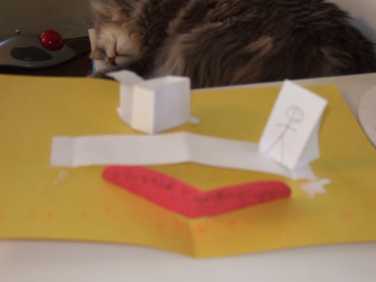
Anyway… I need to play dinosaurs with my daughter but she’s letting me post a couple a couple of picture before we get started…
Here they are….

This is still a very rough prototype… But as they all great journeys begin with a single  step… Now off to dinosaurs………

Posted in pop-up card stuff, Uncategorized | Leave a comment

Trying to figure out where this Scooba 5900 part goes

I recently bought a broken scooba off of craigslist.  The person I bought it from tried fixing it and had a couple of part left over. I’m trying to get this thing put back together to figure out what’s going wrong..

Any help would be appreciated.

Posted in Uncategorized | Leave a comment

Playing around with heekscad again

I’t been a while since I’ve been messing around with heekscad.
I was in 8.04 still and now I’m on ubuntu 10.04

I fired up rapidsvn and download the source no problem.
I opened up the project file with code:blocks to see what happens.
Seems like I’m missing something.

||=== HeeksCAD, Debug ===|
/usr/lib/wx/include/gtk2-unicode-release-2.8/wx/setup.h|1079|warning: “HAVE_IOSTREAM” redefined|
src/stdafx.h|41|warning: this is the location of the previous definition|
/usr/include/wx-2.8/wx/gtk/glcanvas.h|19|error: GL/gl.h: No such file or directory|
/usr/include/wx-2.8/wx/gtk/glcanvas.h|20|error: GL/glx.h: No such file or directory|
/usr/include/wx-2.8/wx/gtk/glcanvas.h|21|error: GL/glu.h: No such file or directory|
/usr/include/wx-2.8/wx/gtk/glcanvas.h|47|error: ‘GLXContext’ does not name a type|
/usr/include/wx-2.8/wx/gtk/glcanvas.h|124|error: ISO C++ forbids declaration of ‘GLXFBConfig’ with no type|
/usr/include/wx-2.8/wx/gtk/glcanvas.h|124|error: expected ‘;’ before ‘*’ token|

Now that’s strange wonder whats up

I did a little googling and found this:

http://ubuntuforums.org/showthread.php?t=235000

Hmm… seems gl.h seems to me missing mesa-common-dev

Loaded but I seems to be missing GL/glu.h which leads to needing this libglu1-mesa-dev

Currently compiling heekscad from scratch. This is going to take some time.

On to other things

Posted in Uncategorized | Leave a comment

Trying to get the codelite debugger to work in Ubuntu linux

Ok… I’m trying to get the codelite debugger to work in Ubuntu Linux.  It seems to be having some issues at the moment.
So… I’m at the code lite website:http://codelite.org/LiteEditor/Debugging

I have my project open and active…. I press the F5 key..

Hmm.. does it work … Nope…
A couple of things seems to be going wrong..

Debug session started successfully!
Debuggee process ID: 6775
GNU gdb (GDB) 7.0-ubuntu
Copyright (C) 2009 Free Software Foundation, Inc.
License GPLv3+: GNU GPL version 3 or later <http://gnu.org/licenses/gpl.html>
This is free software: you are free to change and redistribute it.
There is NO WARRANTY, to the extent permitted by law.  Type “show copying”
and “show warranty” for details.
This GDB was configured as “i486-linux-gnu”.
For bug reporting instructions, please see:
<http://www.gnu.org/software/gdb/bugs/>…
Reading symbols from /home/jonas/.codelite/CppClass/hw_lab_7/Debug/hw_lab_7…
done.
set unwindonsignal on
set breakpoint pending on
set width 0
set height 0
Found the breakpoint ID!
Storing debugger breakpoint Id=1
Successfully set breakpoint 1 at: address 0
Found the breakpoint ID!
Storing debugger breakpoint Id=2
Successfully set breakpoint 2 at: address 0
ERROR: failed to place breakpoint: “^error,msg=”No source file named /home/jonas/.codelite/CppClass/HW_project2/HW_Project.cpp.””
No source file named /home/jonas/.codelite/CppClass/HW_project2/HW_Project.cpp.
ERROR: failed to place breakpoint: “^error,msg=”No source file named /home/jonas/.codelite/CppClass/HW_project2/HW_Project.cpp.””
No source file named /home/jonas/.codelite/CppClass/HW_project2/HW_Project.cpp.
ERROR: failed to place breakpoint: “^error,msg=”No source file named /home/jonas/.codelite/CppClass/HW_project2/HW_Project.cpp.””
No source file named /home/jonas/.codelite/CppClass/HW_project2/HW_Project.cpp.
=thread-group-created,id=”6775″
=thread-created,id=”1″,group-id=”6775″
Continuing…
*running,thread-id=”all”
=library-loaded,id=”/lib/ld-linux.so.2″,target-name=”/lib/ld-linux.so.2″,host-name=”/lib/ld-linux.so.2″,symbols-loaded=”0″
Warning:\nCannot insert breakpoint 1.\nError accessing memory address 0x0: Input/output error.

Also the terminal window has this message:

&”warning:  GDB: Failed to set controlling terminal: Operation not permitted\n”

So…. Time for a little googling:
http://sourceforge.net/users/dymaxionuk

Ok… for me the solution was simple.  I updated from the codelite site and all was well.

Apparently, the version that was in synaptic was having issues.

Posted in Uncategorized | 1 Comment

Part2)Project Generator for Tony Gaddis Starting out with C++ From Control Structures Through Objects

The C++ class I’m in is running at a slow pace relative for my skill sets. The class focused on chapter 5,looping. It’s just that I’ve been doing vb6 programming for a long time and I saw very little new there for me. Although my arrogance here will probably catch up with because I’m probably going to miss something subtle in the midterm because of this.

I like to automate the setup of project folders for the sample code .  I’d like to get this project generator done before the class if over, so I can use it for my class but I need the class to get it done.
Anyway..
Setting up the folders and moving the cpp files is not too painful done manually. Automated folder creation and file copy is being pushed off till later The primary focus at the moment is writing out the project files into the manually created sub-folders.
I’m going for the minimalist approach here, just to get this done and will tune it up a little bit more as time goes on.
Here’s the pseudo code
Find the name of each directory to be inserted(Currently manually created)
read the sample template file a line at a time
If something needs to be tweaked then tweak it
redirect the data into a project file where it needs to go.
So… I’ve hacked up the code a bit and what I need is the C++ equivalent to a vb6 mid$ function.. Man is this a PIA.. I think I found some discussion on that. http://computerprogramming.suite101.com/article.cfm/a_mid_string_function_for_c_and_c_

http://www.daniweb.com/forums/thread1113.html
http://www.bigresource.com/VB-Mid-C-equivalent-RESOLVED-CrKWGrf9ym.html

http://www.vbforums.com/showthread.php?t=257742 !!!! THIS IS THE ONE I USED

Uggg…..

The next issue is that I need to find the c++ equivalent to vb6 instr function. It seems that mid$ and Instr are a couple of my weapons of choice in my vb code arsenal…. I found the c++ equivalent here. http://www.cplusplus.com/reference/string/string/find/ will be the rough equivalent.

On just a side note, if found this hand xref to string functions. http://en.wikipedia.org/wiki/Comparison_of_programming_languages_%28string_functions%29#Find

Lets see. I found some POSIX code that would read directories.  The initial code I found didn’t differentiate between folders and directories.
Hear’s link that discusses that. http://www.cplusplus.com/forum/general/4648/.

Well, while we’re at it, the initial code I had would only show the file name and not the file type. I found that answer in a wiki link:http://en.wikipedia.org/wiki/Dirent.h

Anyway.. I got a basic shell of a program to run, to automatically generate project files, but it’s really too ugly to post at the moment.
I have midterms coming up, and I don’t want screw them up by working on the fancy stuff and missing something obvious so I need to put this on the backburner for the moment.  If someone actually read’s this before I get this project done, end a comment and I’ll post it.

Posted in Uncategorized | Leave a comment

Part1)Project Generator for Tony Gaddis Starting out with C++ From Control Structures Through Objects

I’m really enjoying this C++ class that I’m taking which is using Tony Gaddi’s book. We’re still into the real baby stuff increment and decrement operators, but that’s ok.. I’d rather take it slow (16 weeks) and really learn some nuances about the language rather than trying to absorb it all at once. Been there done that… It doesn’t work for me.. For me anyway, reading a book or watching a video or lecture is just one component of learning. The other component is practice and developing the skill. (Time to get off the soap box and I really wish the cat would not put his ass in my face when I’m typing. I guess it’s cat speak for “I love you”. Sorry… I digress…)

The book provides the source code for all the examples on a CD. I’ve found it useful to compile the projects while studying the chapters and them hacking up the code a bit, to see if it really works the way I think it works. The parts that sucks for me is setting up the workspace and the project files to compile the projects. The first time I tried this was through the IDE which was very very tedius. Second time, I open up the workspace and project files in gedit and figure out how every thing was put together. Is used terminal session repeat functionality to setup the directory more efficiently, but it still non-value action. I would rather spend my time writing a utility that would do this automatically rather than manually. I did a quick google search to see if something like this is out there. It probably is, I just didn’t know how to ask the question.

Might as well give this a try.. If I was doing this in vb6 well, it would be a no brainer except that I’m working in Linux. Programming this in C++ is not so easy for me just quite yet.

Originally I thought I would write a portable app, since I run windows at school,work and Linux at home.. I got the impression this is doable but not quite at the skill set that I’m currently at. I found and interesting link here that discusses that. (On a side note. Once I get more proficient I bet there is a wxwidgets component that could do that).
So… for the moment, I’m scaling this back to work on my home computer and my skill sets improve, have the code get a bit more gucci.
So iInitially, Ubuntu Linux, using g++, codelite IDE.

So.. In pseudo code here is what I’m looking to do:

  1. Read appropriate CD subdirectory and put the directories/file names into arrays
  2. select chapters you wish to generator projects for
  3. generate project folders/sub-folders
  4. copy source code into the appropriate sub-folder
  5. create project files in appropriate sub-folders
  6. create a workspace files linking the appropriate project files

well…
I found some code at http://www.linuxforums.org/forum/linux-programming-scripting/26306-reading-directory-contents-files-c.html that I could hack up and get started.. Wow time flies when your having fun..

On a side note, one of the things I been thinking about is sticking Dro’s on my lathe. I wound up by 3-6 inch Digital Verniers on sale at harbor freight for 10 bucks each.. SPC output… I wonder how hard it would be to interphase with an laptop to make really big letters. I wonder if there is some cheap infra-red (tv remote connection) to get the cables out of the way… Too many ideas… too little time. Time to go to work..


Posted in Uncategorized | Tagged | Leave a comment

Code::Blocks autocompletion woes on ubuntu 9.10 Karmic Koala

I was just looking over some of my past posts and I seem to be having many woes…..
I suppose if everything worked out of the box I never learn anything.

So… I signed up for this C++ class and I’m I’d like to complete my homework assignment using Code::Blocks.
I’ve been really spoiled by the Vb auto code completion and I really would like it working in Code::Blocks.

I’m about 80% sure I had it working before, so something is wrong, probably something subtle and obvious….
So… A little research here lead me here which directed me:http://wiki.codeblocks.org/index.php?title=FAQ#Q%3A_How_do_I_get_Code_Completion_to_work.3F
First things first, my system just got done updates, I’m just going to reboot to be on the safe side..
Ok… Lets see.

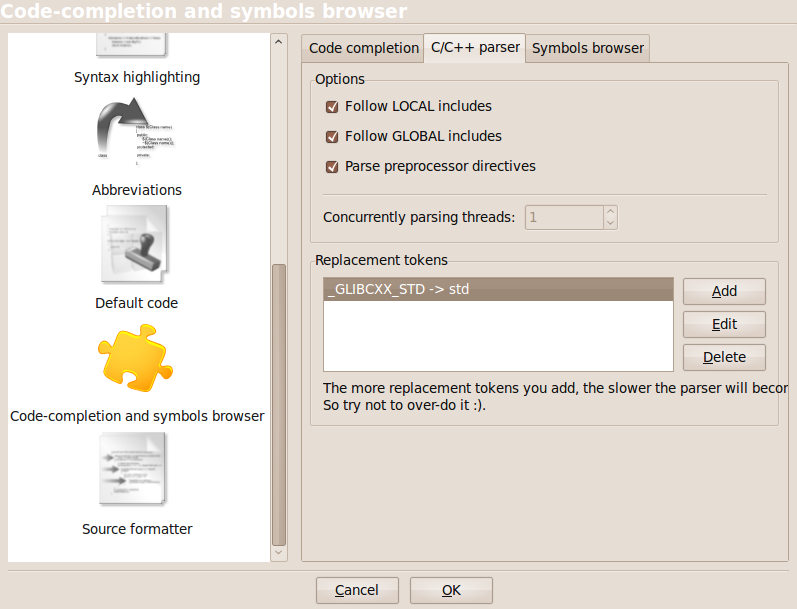
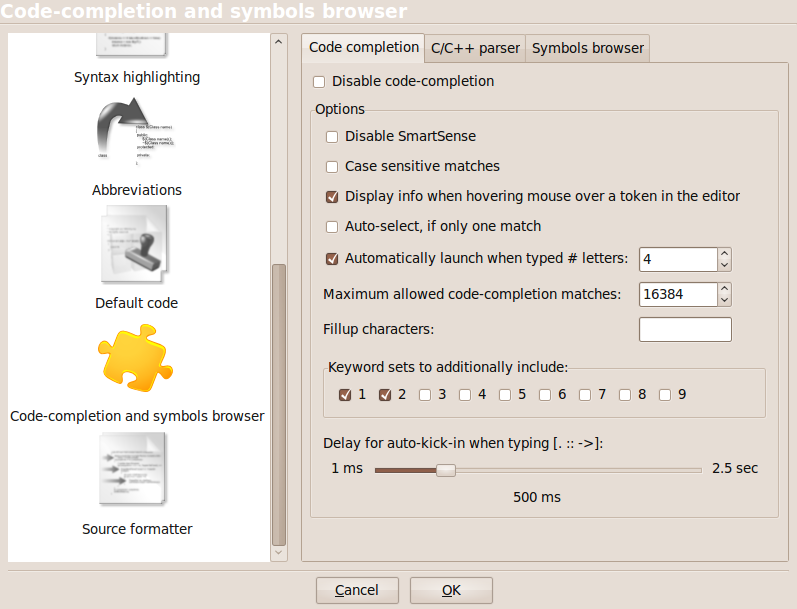
A: Did you check how code completion is configured ? See “Settings/Editor”, click on “Code-completion and symbols browser” in the left column and check the Code completion and C/C++ parser tabs.

;
<

Ok… Everything looks fine… Was I typing 4 characters(Ok…. if something is wrong here I don’t see it..)

Next step

They ‘re mostly useful when you don’t add compiler search dirs in build options but use backticked expressions (e.g. freetype-config --cflags). In this case, the parser is not aware of where the source files are located. So, by manually adding the directory in the parser’s search dirs you ‘re actually helping the parser find the files..

Huh… What the heck does that mean? I’m trying to get code completion to work on a program that’s on the level of primordial ooze. (I’m thinking that’s not the issue here.. Wasting a bit too much time here…. I need to get this homework done first without autocompletion (yech!!)
I just cant give it up..
Found some more stuff here..
http://forums.codeblocks.org/index.php/topic,10564.0.html

Ok… I basically got no where sort of fast here…
I just want some features with code completion sort of like my beloved vb6.
So… I decided to try codelite instead of codeblocks from the repositories.
When I ran from the repositories every thing was fine out of the box. IDE doesn’t have all the bells and whistles of code::blocks but from what I recall of when the code completion was working, it seems superior.
It tried upgrading to from Rev2893 from the repository to Rev3681 things got weird. I kept getting “/bin/sh: mingw32-make.exe: not found” eventhough i had the IDE set for g++ . Don’t know don’t care what was going on there. Right now I have code completion working for the kindergarten level of C++ that I’m at so that’s good enough for me.

Posted in Uncategorized | Tagged | Leave a comment

wordpress woes….

I’ve been trying to get a wordpress site up for my wife.

I’ve been trying to use the wp-tables reloaded plug-in along with Station 1.2.1 theme by Plugins.

So far no luck on getting the plug-ins to work. The authors support page had a post with the exact issue that I’m having.
http://tobias.baethge.com/wordpress-plugins/wp-table-reloaded-english/support/

The question of things to check:

this is most likely caused by your theme, which probably shows your posts by using the template tag “the_excerpt()” or a modified version of “the_content()”.

Are other plugins with shortcodes working?

WordPress hasn’t really been my focus (what the heck is a shortcode), but I do want to keep the wife happy… 😉
So… I found a quick link on how to make a short code…
http://www.smashingmagazine.com/2009/02/02/mastering-wordpress-shortcodes/
I thought I try the hello world and see if it works. Yep…..
Duh…. Just figured it out… I type the shortcode with the visual tab instead of the HTML.  That makes a world of difference….

I can go to bed happy…

Posted in Uncategorized | Tagged | Leave a comment

New year stuff and general directions….

Well, I’ve been off with the Christmas shut down and you’d think I’d have hours and hours of time accomplishing oodles of stuff.
Well, for some reason it hasn’t worked out that way…. It seems like the diet is blown and my gtd reviews have gotten a bit lax and the list grows a bit longer.

I did manage to get one significant thing done though…. I finally managed to get my wordpress blog updated from 2.1.5…. That is  a nice feeling.

I’ve got a bunch of irons in the fire perhaps a few too many… but that’s ok..
I’ve been wanting to get a Stirling engine built as a fun project… I sort of mothballed the Stirling out of the November/December 2005 home shop machinist, in favor of making a ltd Stirling.

The plan was originally to build a bunch for Christmas presents but that was biting a little bit more than I could chew.

I did a bit of surfing(perhaps and little bit too much) and found all kinds of interesting sites with construction plans on ltd stirlings.
I was beyond impressed when I ran across Jan Ridders site http://heetgasmodelbouw.ridders.nu/index.htm .  All I have to say on this is wow.
I wonder if this guy hit the lotto and gets to play all day in his shop….
Anyway.. There was a couple of plans than caught my eye.
This plan uses a couple of CD’s as a flywheel.
http://heetgasmodelbouw.ridders.nu/Webpaginas/pagina_ltd_stirling_met_cds/cd_dstirling_frameset.htm

I also downloaded the tea-cup stirling, which is also cool but I don’t know if I’ll have time for that one.
http://heetgasmodelbouw.ridders.nu/Webpaginas/pagina_stirling_eierdop/eierdop_frameset.htm

I found a bunch of interesting stirling stuff Steam and Engine of Australia . You can easily spend on a couple of hours poking around this site.

Cnccookbook.com has a bunch of stirling links that look interesting also.  This guy has a nice site that’s worth going to.. It’s sort of a executive summary for home shop machinists.

peswiki.com also has a bunch links for stirling.  There’s something about the look and feel about this site is not my favorite.  It sort of kept me from diving into the content…

Posted in Stirling | Leave a comment

Repair of a push mower roller bracket using my metal shaper

This was sort of a fun project for me.  I had this push mower that I had inadvertently busted the roller bracket on when I backed it up hard on my driveway

 Middle
I had some stock with pre drilled holes in stock which I need to plan down in thickness but my width was perfect. I had a couple of false starts which you see in the picture as I was trying to get the tool group properly. Originally I had this my mill and it wasn’t fun.  The material was hardened and I don’t have a power feed on my mill. Hand cranking was very tedius. The autofeed on the shaper was much nicer.
 Middle

I’m actually doing a straight downward plunge in this picture.  What I did was take a rough cut.  Measure the width and than adjust the horizontal with the indicator.. It seemed to work pretty good.

 Middle

In needed to replicate the boss than was in the original part  So, I scribed the center lines and hit it with a optical center punch.  In the picture I’m getting the punch mark zero’d out in my four jaw chuck.

 Middle

 Middle

You can see the machined boss in this picture. Here I’m center drilling it, in preparation for drilling and tapping

 Middle
Here you can I’m tapping the part, using a tap holder I made in a shop class many many years ago.
 Middle
I wound up using a shoulder bolt of the correct diameter, got some loc-tite and screwed it in. I than cut the head off and rounded what needed to be ground. Hopefully the loc-tite will hold, since I just realized looking at the picture that the stud could in theory unwind. As you can tell from the leaves on the mower its fall and I won’t be mowing the lawn till spring. 😉 Hmm…. The blades are sort of dull, I wonder if I could rig something up to sharpen them.

 Middle

Posted in Machining | Leave a comment