Using Code:Blocks to Compile zedcode’s wxwidget tutorial in Ubuntu Linux

Here are steps on how run the zedcode wxwidget tutorials in Code::Blocks without using a wizard.

In this instance, I want to get the tutorial titled “A simple button” working.
Step 1) Start the Code::block IDE
Step 2) Select File=>New=>Project
Step 3) Click on the “Empty Project” icon and click next a couple of times till you are asked for a project file name.
(Note! one of the things that confused me initially was that when you enter a “project title” the file name and directory are also automatically created using the same name.  It took a little time for me to get used to that)
Step 4) Use Shift+Ctrl+N to add blank files. I named the file and the pasted the info from the web site.
If you attempt to Build=>Build at this point, chances are that it will error out.

Step 5) At this point, you need to add  wx-config to the project so you the compiler and linker know where to go to get the wxwidget object.

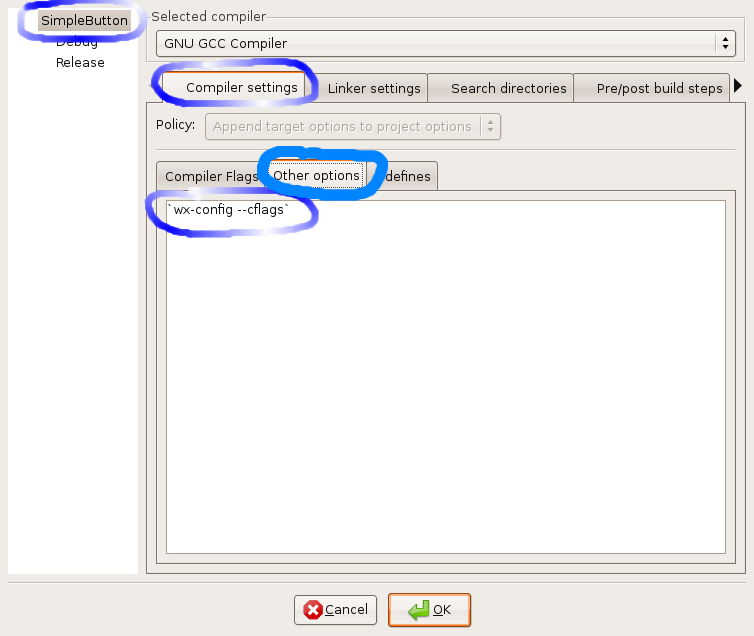
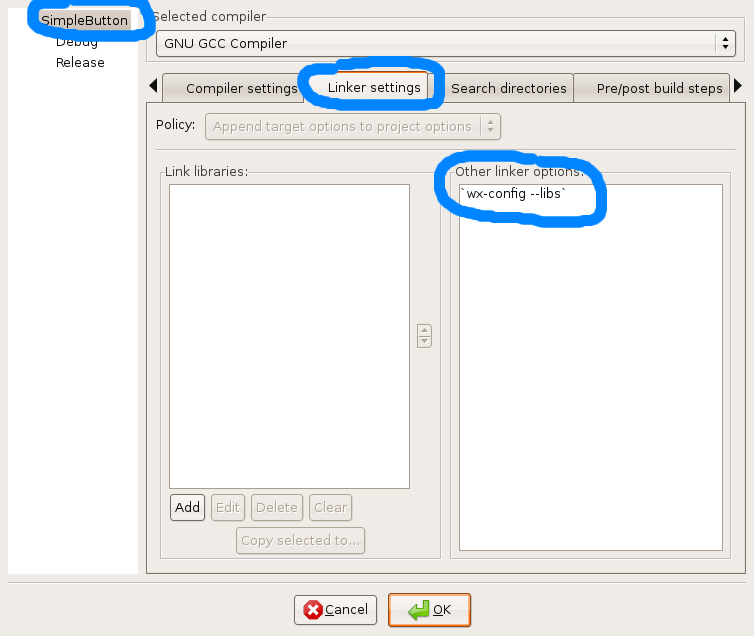
Set 5.1) Select Project=>Build Options
Set 5.2) Enter the compiler option: wx-config --cflags
(Not the back quote and double “–“)

Step 5.3) Enter the Linker option: wx-config --libs

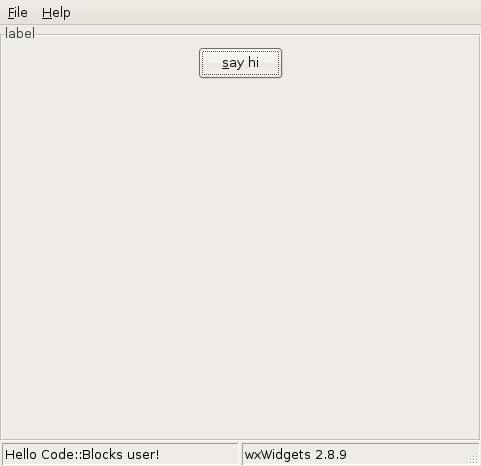
Step 6) Build and run. If everything went correctly, you should have something that looks like this:

Posted in Uncategorized | Leave a comment

Getting started guide for code::blocks

I’ve been playing around with code blocks, but there so much in there it’s sort of hard to know where to get started.  I was looking for a way to create a project from existing source files and somehow stumbled on this link which looks sort of interesting to me:www.sci.brooklyn.cuny.edu/~goetz/codeblocks/

The instruction guide caught my eye.  It has some very basic getting start information in it.  I also instructions for settting up some c++ help information within the IDE. I need to research that a little further. Unfortunately, these instructions are for the Microsoft world.   This may come in handy for my MS stuff, but I’m not sure if i want to integrate it into my Linux version of Code::blocks at the moment.
But…. I did see a chm addon for firefox.  Here it is:https://addons.mozilla.org/en-US/firefox/addon/3235

I downloaded the chm file opened it up in firefox and it seems to be ripped from this site:http://www.cppreference.com/wiki/start I’m not going to pursue this further.

Ok… Here’s my immediate objective. I to get proficiency code::blocks and go through the tutorials on a wxwidgets tutorial to get basic understanding.
So… I got hung up on all the cool tools… I think I just need create an “Empty Project” called SimpleApp.   Now I’m looking at http://zetcode.com/tutorials/wxwidgetstutorial/firstprograms/

I don’t see any source downloads for this stuff, so I’m going to try copying and pasting and see what happens..
So in this tutorial the first file listed is “simple.h”
Ok… at this point I in code::blocks I created a empty project and now I’m going to a empty file by selecting file->New-> Empty File (hot key is Shift+Ctrl+N)
I selected all when prompted for Debug and Run.

This all when very quickly, unfortunately, when I tried to build this I come up with this error.
/home/jonas/projects/zedcode_tutorials/SimpleApp/main.h|1|error: wx/wx.h: No such file or directory|
/home/jonas/projects/zedcode_tutorials/SimpleApp/main.h|4|error: expected class-name before ‘{’ token|
/home/jonas/projects/zedcode_tutorials/SimpleApp/simple.h|4|error: expected class-name before ‘{’ token|
/home/jonas/projects/zedcode_tutorials/SimpleApp/simple.h|6|error: expected ‘,’ or ‘…’ before ‘&’ token|
/home/jonas/projects/zedcode_tutorials/SimpleApp/simple.h|6|error: ISO C++ forbids declaration of ‘wxString’ with no type|
/home/jonas/projects/zedcode_tutorials/SimpleApp/main.cpp|6|error: expected constructor, destructor, or type conversion before ‘bool’|
||=== Build finished: 6 errors, 0 warnings ===|

Heh?
Here are the locations of wx.h on my system anyway.
jonas@Ubuntu4:~$ locate wx.h
/usr/include/wx-2.6/wx/wx.h
/usr/include/wx-2.8/wx/wx.h

Ok this Blank project, it all makes perfect sense….. I remember when selected the wx version it prompted for a version. Hmmm. Do I want to did into the guts and figure out… So… I need to tell the compiler to look in the appropriate spot for the project only….

I think I found something to try here: http://wiki.codeblocks.org/index.php?title=Compiling_wxWidgets_2.4.2_to_develop_Code::Blocks_(MSW)

Option 2: Setting up the paths manually

These instructions are to be followed by those who plan to use the 2.6 version of wxWidgets, or want to build their own version (i.e. with unicode support). Since you can’t use both 2.4.2 and 2.6 libraries at the same time, you have to keep them in separate directories.

Open the CodeBlocks.cbp, to be found in your local Code::Blocks source directory (for example “C:\codeblocks\src”). Open up the build options, change the tab to “Directories” and add the following, replacing <WXW> with your WxWindows directory, for example “C:\wxWindows-2.4.2” (without the quotes):

Compiler

  • <WXW>\include
  • <WXW>\contrib\include
  • <WXW>\lib\mswdll

Linker

  • <WXW>\lib

Resource compiler

  • <WXW>\include
  • I played around with this a little, I’m not sure this is the correct path at the moment.
    I can use the project wizard and get a basic template up an running from the get go… My suspicion is that I just need to find the appropriate commands in the cbp file and paste it in.

    <?xml version=”1.0″ encoding=”UTF-8″ standalone=”yes” ?>
    <CodeBlocks_project_file>
    <FileVersion major=”1″ minor=”6″ />
    <Project>
    <Option title=”SimpleAppTest” />
    <Option pch_mode=”0″ />
    <Option compiler=”gcc” />
    <Build>
    <Target title=”Debug”>
    <Option output=”bin/Debug/SimpleAppTest” prefix_auto=”1″ extension_auto=”1″ />
    <Option object_output=”obj/Debug/” />
    <Option type=”0″ />
    <Option compiler=”gcc” />
    <Option projectLinkerOptionsRelation=”2″ />
    <Compiler>
    <Add option=”-g” />
    </Compiler>
    </Target>
    <Target title=”Release”>
    <Option output=”bin/Release/SimpleAppTest” prefix_auto=”1″ extension_auto=”1″ />
    <Option object_output=”obj/Release/” />
    <Option type=”0″ />
    <Option compiler=”gcc” />
    <Option projectLinkerOptionsRelation=”2″ />
    <Compiler>
    <Add option=”-O2″ />
    </Compiler>
    <Linker>
    <Add option=”-s” />
    </Linker>
    </Target>
    </Build>
    <Compiler>
    <Add option=”wx-config --cflags” />
    <Add option=”-Winvalid-pch” />
    <Add option=”-include wx_pch.h” />
    <Add option=”-DWX_PRECOMP” />
    <Add option=”-Wall” />
    </Compiler>
    <Linker>
    <Add option=”wx-config --libs” />
    </Linker>

    <Unit filename=”SimpleAppTestApp.cpp” />
    <Unit filename=”SimpleAppTestApp.h” />
    <Unit filename=”SimpleAppTestMain.cpp” />
    <Unit filename=”SimpleAppTestMain.h” />
    <Unit filename=”wx_pch.h”>
    <Option compile=”1″ />
    <Option weight=”0″ />
    </Unit>
    <Extensions>
    <envvars />
    <code_completion />
    <lib_finder disable_auto=”1″ />
    <debugger />
    </Extensions>
    </Project>
    </CodeBlocks_project_file>

    I basically tried pasting that in from the wizard generated file into my file highlighted in bold italic (while the project was closed). Lets see what happens..  In this particular instance I copied over the wx_pch.h file from my one project to the other and it worked… Hot darn..

    Ok… I read something that the wx_pch.h saves compile time… But at the moment I’m just working through the zednet tutorial, I’m going to see If I can loose it..  So… I’m going to use the wizard to generate another template without the wx_pch.h option and see what I need to paste in..

    Ok… I think this is what needs to be added to the project file
    <Compiler>
    <Add option=”wx-config --cflags” />
    <Add option=”-Wall” />
    </Compiler>
    <Linker>
    <Add option=”wx-config --libs” />
    </Linker>

    So… I’m going pack into code::blocks via the Gui and remove wx_pch.h file from the project d resave and exit and then delete the file also from the main project directory (there was also some other pch file that got generated, I blew that away also.
    I reopened the project and did a Build=>Clean Work Space, a Build=>Clean Rebuild..
    Ok… This works…. Now a terminal also gets opened up when I do this. I’m not going to fret about this for now….
    I think I figured out how to run the tutorials from a blank project which is good.

    😉 🙂 🙂 🙂 😉
    I found some more links on the subject:http://wxconfig.googlepages.com/

    and some more:

    http://wiki.wxwidgets.org/Code::Blocks

    Posted in Uncategorized | Leave a comment

    wxobject hierarchry

    I have no time this morning.
    I want to take a study the object hierarchy today. Here’s a link:
    http://www.wxwidgets.org/docs/hierarchy_stable_image.htm

    [Update: Unfortunately, the links in this page are not current] I need to find something more current]

    Posted in Uncategorized | Leave a comment

    Update Generate inherited classes Wxformbuilder

    I sort of understand the design of wxformbuilder and the base class you don’t mess with. I like the utility Generate Inherited Classes, but according to this tutorial :

    wxFormBuilder can even do a one-time generation of a bare-bones inherited class with it’s useful “Generate Inherited Class” dialog.

    I found a relatively fresh post where this is apparently still the case http://forum.wxformbuilder.org/index.php?topic=443.0. To this, newbies eyes this is a limitation when compare to the creature comforts of the vb6 IDE. This seems strange to me, but perhaps, I should just work with this a while and give them the benefit of the doubt.

    I still need to study up on wxwidgets. My preference is to make good first impression by sounding somewhat intelligent on the wxformbuilder forum.
    I think this is a good place to start:http://zetcode.com/tutorials/wxwidgetstutorial/

    Posted in Uncategorized | Leave a comment

    Moving beyond the tutorials in Code::blocks and wxformbuilder

    Ok…. I got up real early on Sunday to play and my body needed to catch up on Monday morning, so I don’t have much time here before I need to get off to work.  Apologies in advance for bad grammar and spelling.
    So I 00000000000000000000000000000000000000 (that was the cat). Everyone thinks they can blog 😉
    Lets try this again.  I’m starting to get the feel for the IDE…  Code::builder isn’t too bad.  I like you can click on an error and go to the offending line of code.  Much nicer than using a text editor.

    Also, I found the wxforumbuilder file is in the project list(under others) can be opened up by right clicking it and answer the appropriate option

    Also, what I liked was that when you generated the code from Wxfb and went back to C::B, the IDE would automatically asked you if you would like to rebuild.

    One more thing that I liked, wxfb has a new project wizard that will optionally create a basic wxfb for you with some functionality.

    But…. not all is good here.

    I’m under a time crunch here, so I can’t verify the appropriate techno babble but here goes:
    Wxformbuilder store the form in a xml format and then generates a file in CPP with the base class[?] form.  You’re not supposed to mess with this form in anyway shape or form.
    To get the widgets to do their thing, you create an object which inherits the form and through the use of virtual functions you give them their functionality.
    Wxfb actually has a utility to generate the inherited class and gives you a fill in the blank spot for the functions.  Here comes the rub:
    The generate inherited class utility doesn’t append it appears to overwrite… That really sucks..
    Now to be fair, I need to research this a little bit further, to see if I’m not doing something correctly.

    A couple of quick links of interest that I need to add to favorites:
    http://docs.wxwidgets.org/stable/wx_contents.html

    http://wxforum.shadonet.com/viewtopic.php?t=82

    http://zetcode.com/

    http://osdir.com/ml/lib.wxwindows.general/2004-01/msg00346.html

    Ok… really got to get going here.
    Current pursuit is to take my c++ dummies book and to put a wxwidget front end on the terminal examples.   Current efforts are like trying to learn  walk again.  Currently I’m trying to get a text box to respond to a change event.  This is  something that is soo….. easy in vb6 because I’ve done it a thousand times before.  Since I’ve never done it in wx it’s well not so easy….. That’s why I practice..  Not such a big difference between playing the piano and programming. Good results require effort. (Unless you’re a Mozart( which I’m not)).

    Posted in Uncategorized | Leave a comment

    More on starting with code::blocks wxformbuilder in linux

    Yesterday, I was playing with code::blocks on a xp machine with a gnu compiler (at my mothers house on my sister computer).  Today I’m trying it on my Linux box.  My Linux box has  a older process with a sucky monitor.  Yikes what a difference…

    For some reason I’m thinking I want to run wxformbuilder with code::blocks.   I’m trying to determine if there is a plugin for it.
    If found a interesting link from 2005:http://forums.codeblocks.org/index.php?topic=193.msg19430

    I guess there is no direct plugin for wxformbuilder even though the code::block gui makes reference to it.. Anyway this is the best link I could find that I think describes the situation so far.
    http://forums.codeblocks.org/index.php?topic=8868.0

    Ok,,, Now this is embarrassing.  I’m trying to remember how to upload an image to my website..
    I now I have a SSH connection all setup.. Just how to find the darn thing… Just can’t remember how I did it… Doh… Spent a lot of time trying to figure out I had it in places=> Book Marks.
    So… I just joined the codeblocks forum and appended to the above post.  I guess well see what happens…
    Ok I think I’m going to switch from this tutorial now from  http://wiki.codeblocks.org/index.php?title=WxSmith_tutorial:_Hello_world

    to:
    http://wiki.wxformbuilder.org/Tutorials/UsingWxFormBuilder

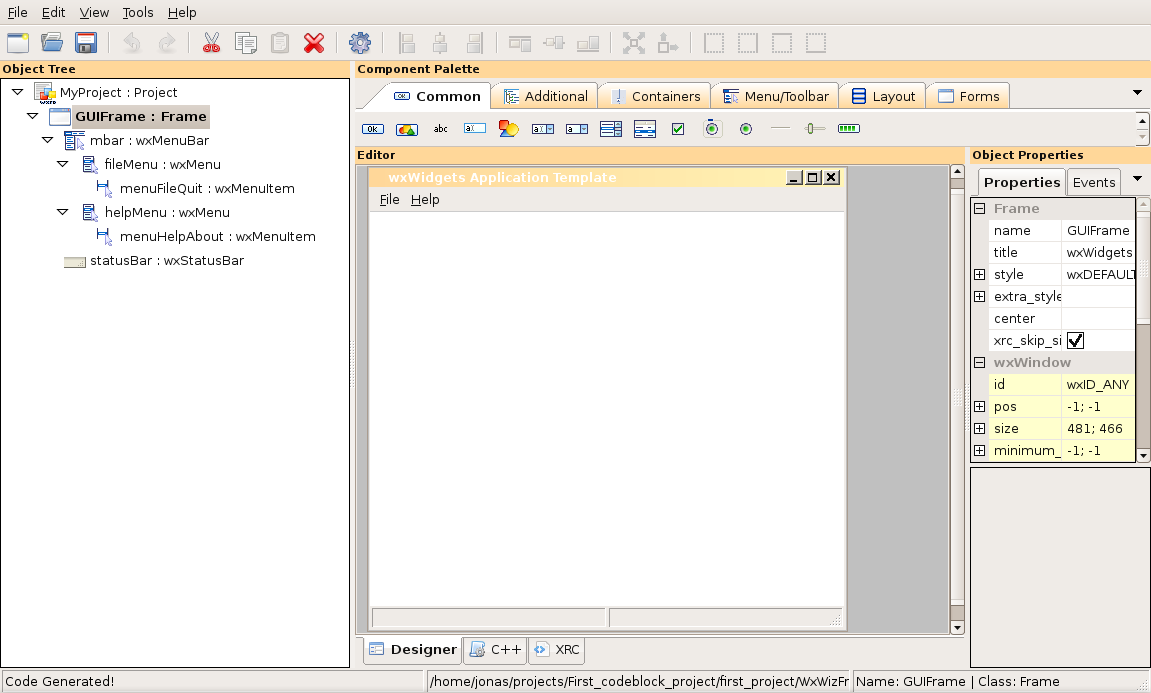
    Ok…. Now hold the phone… Apparently, when I went through the code::blocks new projects wizard  wxformbuilder was one of the default options I picked.  It looks like it opened up  some kind of file called WxWizFrame.fbp.  I guess I should open that up and work within that.
    This is what it looks like:

    At this point, all I want to do is to figure out how to make the VB6 equivalent of creating a command box and having generate a message box of hello world msgbox…. How hard can that be??

    Ok… So now I added a wxStaticBoxSizer to the frame and I added a wxButton along with the stuff necessary to do something on a click event.
    I saved and generated the code.  I guess I need to generate the inherited classes now…
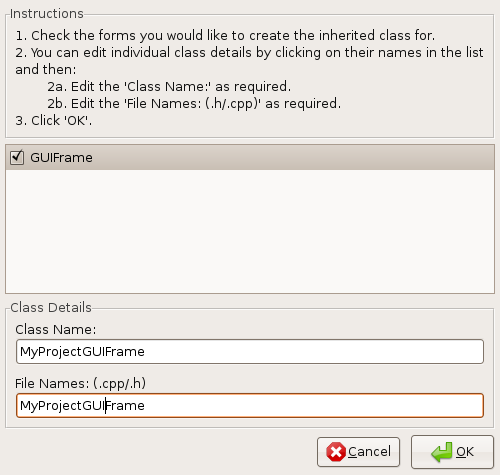
    From wxformbuilder: Tool=>Generate Inherited Class
    This is the what popped up.

    So I clicked on GuiFrame and pressed OK, Hmmm Nothing bad seemed to happen.

    Alrighty… I want to see if I can compile the project through the code::block IDE know and see what happens..
    In Code::Blocks I select Build…  Nothing bad seemed to happen.
    Now Code::Blocks I hit Run

    Hot darn… This was not too bad..

    Ok… At this point I don’t have anything in the say say Hi widget.
    But… It looks like help generates a msgbox of sorts.  I need to study all this a bit and figure out how to add that Little bit to the code.  Then I need to see what happens if I add another wxwidget and generate inherited classes…  So far this doesn’t seem too bad..

    Posted in Uncategorized | Leave a comment

    Code::Blocks Wxwidgets and XP

    Ok… So it’s the day after Thanksgiving…
    My family went to the Strongbow Inn in Indiana, and are jaws dropped when we got the bill.
    It was one of those situations where the food was nice, but it wasn’t that nice.
    Let me put it to you this way, if we would have cooked at home and invested what it cost us, we would have had leftovers for a month..
    Next year we’re having Thanksgiving at my house. I wonder how many people will do the same after that wallet lightener.. Prefer Thanksgiving at home anyway…

    I’m experimenting with code blocks on a XP machine at the moment.
    I hind site, I wish I documented everything I did up to this point.
    I downloaded, wxwidgets, code::builder, wxformbuilder and somewhere along the way gcc was included in one of the packages.
    Somehow I reached a decision to use wxformbuilder over Glade, but I appears that wxsmith seems is native to code::blocks. It doesn’t appear a big deal to go over to wxformbuilder.
    I found a hello world example at http://wiki.codeblocks.org/index.php?title=WxSmith_tutorial:_Hello_world

    I installed everything and started to go through the step by step tutorial and I sort of hit a snag at this point of the tutorial

    When you follow another wizard pages, you may occasionally see message box saying that debug configuration can not be found. This is because the wxWidgets library was build using release mode (the BUILD=release option used for make). If you want real debug library, you can recompile your wxWidgets by using BUILD=debug. Project may also be tuned to work with release version on both debug and release build targets (the way to do this is presented at the end of this tutorial)

    I start poking around a bit with this stuff and it appears this is sort of a big deal. Basically, if you don’t know what your doing your going to want to switch this to BUILD=debug.
    Perhaps this is a good thing that my progress has gotten slowed a bit here… There are a bunch of questions whose answer are very fuzzy to me. Code::blocks seems to allow multiple compilers. My understand is that pre-compiled libraries across multiple compilers is not a big deal across c applications but is a big headache with C++. Light bulb went off. Is that a reason why Gtk+ is written in c.

    Somehow I got myself pointed to this link I need to research: http://www.wxwidgets.org/docs/faqmsw.htm

    So… The issue is whether to use gcc or a windows compiler for XP. But…. for now I have help start putting up the christmas tree. 🙂
    The saga continues here

    Posted in Uncategorized | 1 Comment

    Playing around with wxwidgets, wkformbuilder Code::blocks

    I was just reflecting with on the long line of stuff that I’ve looked at prior to getting to this spot.
    I’ve looked at QT, gtk, gtkmm and finally wxwidgets.  I’ve glanced at glade and wxwidgets. I’ve played a little bit with Anjuta, Netbeans, Emac’s.
    For the first time, I had a  real comfort level from the get go when I went through the wxformbuilder tutorial.  I guess to be truthfull, the comfort level sort of ended at step 10, when it started talking about integrating the generated code into an IDE.    To quote:

    Now it is time to integrate the generated code with your IDE (Visual C++, Dev-C++, Code::Blocks…). You will have to add the generated files (tutorial_gui.h/cpp) to the project.

    I found a most excellent wiki site which a cross comparison of IDE’s across multiple platforms. But first searching for that I ran into a general discussion about IDE’s

    I statement in the above article rings true for me:

    However, because an IDE is by its very nature a complicated piece of software, this high productivity only occurs after a long learning time.

    Anyway, based on the cross comparison I felt that Code::blocks would suit my needs. I downloaded the PDF for it and it’s massive…. The quote about a complicated piece of software comes to mind. I need to do a little searching for a quick start tutorial…..

    Posted in Uncategorized | Leave a comment

    Vb6 Gui Programmer at heart working towards cross platform: Wxwidgets

    Ok… So I manage to get to Technique 2 in Matthew Telles’s C++ Timesaving Techniques for Dummies.
    My Linux GNU compiler is yapping about this and that, sending out warnings about the “gets” that are in the source… (Some details about that in yesterdays post).
    Anyway… the author kept the code very simple to demonstrate his points.  The section of code that’s having issues, wants you to provide the file path and name to a text file.  I know this is just an exercise, but darn, this is kind of coding is what I used to do in my dos days with quick basic…  Forget that…….
    That’s gets me thinking about my beloved vb6 common dialog command control, where, I can browse and click on what I want.  I’m can almost guarantee that I will never code anything entering a filename and path from a command line.  Yechhhhh.

    From discussions I’ve on the Ubuntuforums, in regards to my desire for cross platform programming, it seems like wxWidgets is the tool I’m looking for.  I did a little searching and I think what I’m looking for is something called wxfile or something like that. So…. I took the plunge and downloaded wxWidgets off of synaptic..   I fired up the IDE for the first time, and it feels familiar…   Alright….  So that’s where I’m at.  I’m going to play with this for a while and see if I can build some massive overkill into a very simple example.  Maybe I’m weird, but to me, this is fun.  Ok… I’m just weird.

    First step work through the tutorial at http://wiki.wxformbuilder.org/Tutorials/UsingWxFormBuilder

    Next step is to load up an IDE.  I chose, code::Blocks IDE.  I had a bunch of issues installing this, but ubuntuforums had the cure..

    Posted in Uncategorized | Leave a comment

    Working through code and things to avoid.

    I’ve been starting to work my way through C++ Timesaving Techniques for Dummies.
    I’m a little reluctant to post publically out of respect of copyright.
    I’m digesting Technique 2 Using Abrstraction to Extend Functionality and I start getting compiler warnings and the program crashes…
    He’s using some C library functions that are allowed but not recommended.
    To be fair, he’s trying to keep the code simple to demonstrate abstraction and virtual functions.  The issue appears with the gets command in Linux and g++
    Regardless I learned something new insofar as to what not to do…..  It just makes me uneasy studying code that is considered bad practice in C++ while trying to learn C++
    I ran across this link that I found interesting.
    Things to Avoid in C/C++ — gets() , Part 1

    Posted in Uncategorized | Leave a comment